IM300 Intelligent Power Monitoring Instrument
Switching value input 1 shift event
Switching value input 2 shift event
Switching value input 3 shift event
Switching value input 4 shift event
④
Status of event. 0: “on” to “off” ; 1: “off” to “on”.
⑤ The time of the event occur.See in fig 3-5-2: the time of the event occurs
is 2007-11-27 13:21:59 253ms
If you have multiple SOE events, press or buttons to page up and
down buttons to view.
Note: If all SOE events have been uploaded via communication or all SOE
events in memory have been cleared through local operations, the " "
mark in the lower left corner of the screen will disappear.
3.5.3. Inquiry the limit alarm SOE Operation
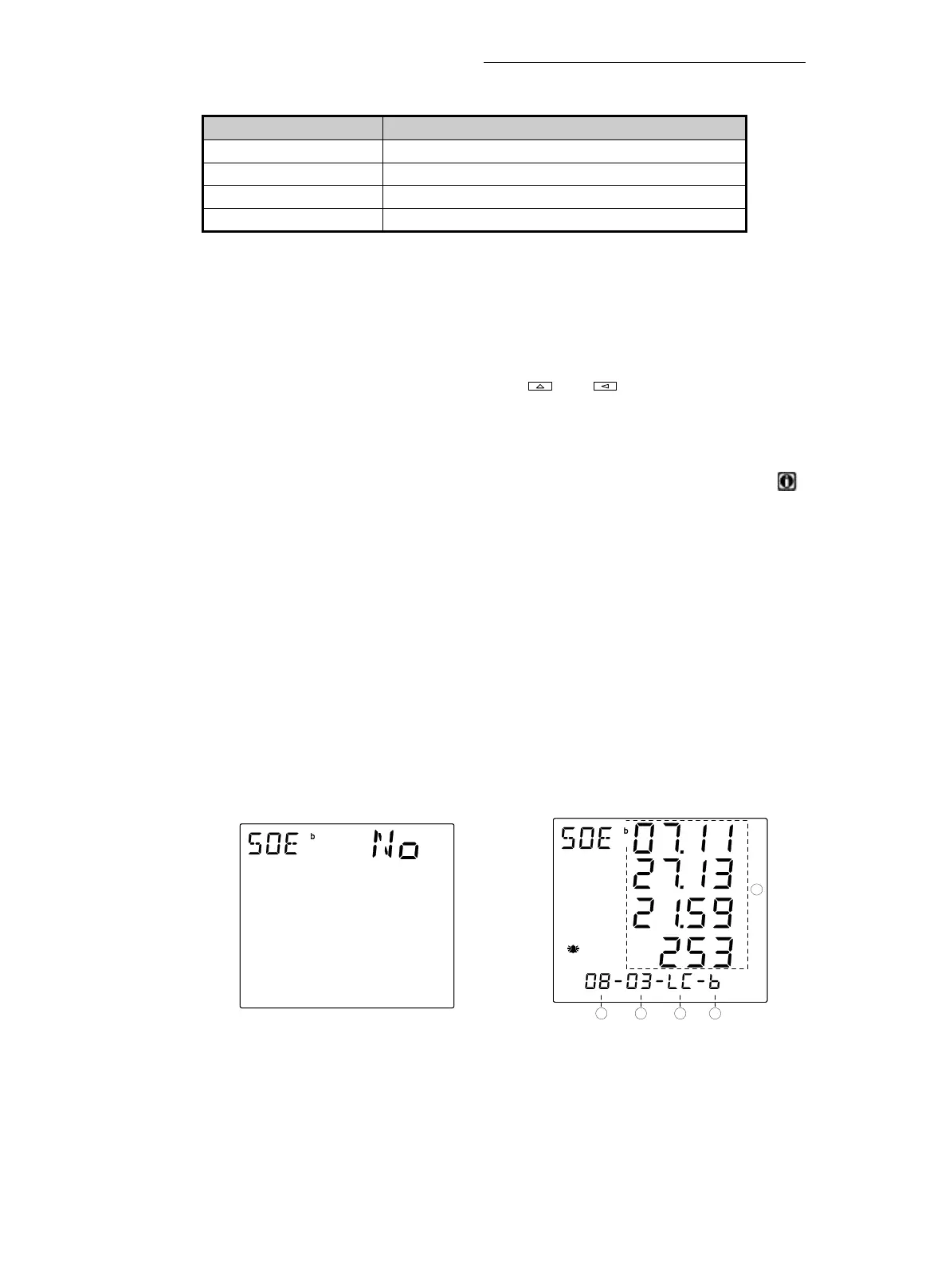
If there is no limit alarm SOE record in RAM, after entering the inquiry SOE
mode, the "NO" is displayed on the top of the screen, as shown in fig. 3-5-3. If there
is limit alarmSOE record in RAM, after entering the inquiry SOE mode, as shown in
fig. 3-5-4.
① The total number of limit alarm SOE events (the maximum is 16).There are
8 recorded events in the picture.






 To Next Page