EasyManua.ls Logo

ABB NE870 - User Manual

ABB NE870
36 pages
Print Icon
To Next Page IconTo Next Page
Loading...
800xA Networks
NE870
User Manual
Question and Answer IconNeed help?

Do you have a question about the ABB NE870 and is the answer not in the manual?

Summary

Safety

Warning

Provides crucial safety warnings regarding laser ports and operating temperatures for safe operation.

Section 1 RNRP Router;Firewall

Power and CPU Module

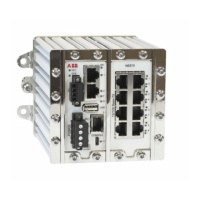
Explains the power and CPU module, its interfaces, connections, and digital IO port functionality.

Section 2 Interface specifications

Connection to Console Port

Details console port connection via USB to serial converter for Command Line Interface (CLI) access.

Power Connection

Explains redundant power connection options, including positive and negative input pins.

Section 3 Interface Modules

Eight Copper Ports

Specifies performance and connection details for the eight RJ-45 Ethernet ports, including data rates.

Configuration

Details unit configuration via web browser, including default login, IP settings, and password change.

Cable Factory Reset on NE870

Explains the procedure to reset the unit to factory default settings using two straight Ethernet RJ-45 cables.

Proceed with Factory Reset

Describes the steps to confirm and initiate the factory reset process after the ON LED starts flashing RED.

Summary

Safety

Warning

Provides crucial safety warnings regarding laser ports and operating temperatures for safe operation.

Section 1 RNRP Router;Firewall

Power and CPU Module

Explains the power and CPU module, its interfaces, connections, and digital IO port functionality.

Section 2 Interface specifications

Connection to Console Port

Details console port connection via USB to serial converter for Command Line Interface (CLI) access.

Power Connection

Explains redundant power connection options, including positive and negative input pins.

Section 3 Interface Modules

Eight Copper Ports

Specifies performance and connection details for the eight RJ-45 Ethernet ports, including data rates.

Configuration

Details unit configuration via web browser, including default login, IP settings, and password change.

Cable Factory Reset on NE870

Explains the procedure to reset the unit to factory default settings using two straight Ethernet RJ-45 cables.

Proceed with Factory Reset

Describes the steps to confirm and initiate the factory reset process after the ON LED starts flashing RED.

ABB NE870 Specifications

General IconGeneral
BrandABB
ModelNE870
CategoryNetwork Router
LanguageEnglish

Related product manuals