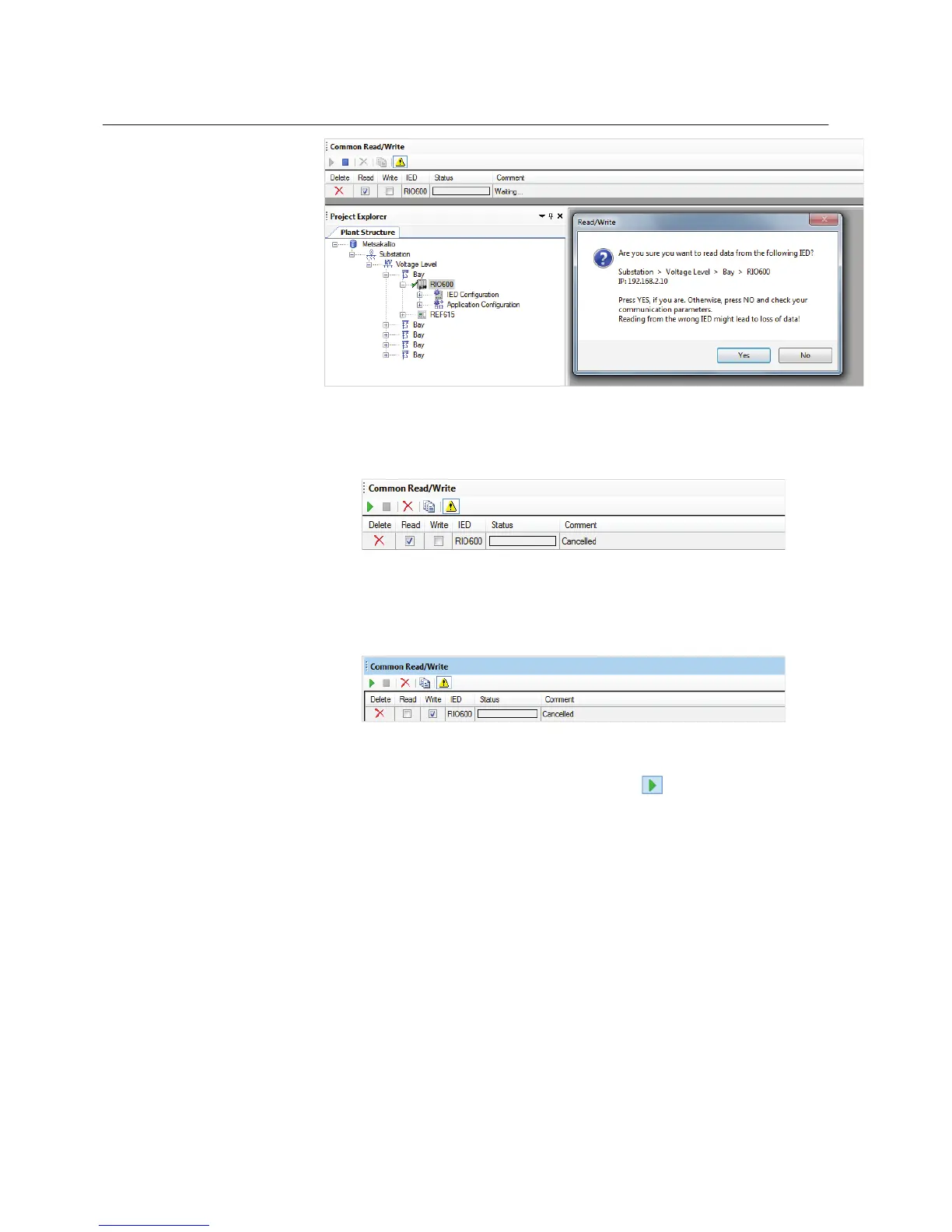
GUID-E2848134-3CA9-4C69-BD4B-E57F7659A479 V1 EN
Figure 55: Confirming read operation
• Click No to cancel the Read/Write operation.odai
GUID-5FED9704-9FD2-49F0-8A9C-1964A74CA3C3 V1 EN
Figure 56: Cancelling operation
• To switch between the read and write operations, use the check boxes in
the Common Read/Write window.
GUID-47E0208F-4E32-4A8A-A8AF-6F636B7FAAD2 V1 EN
Figure 57: Switching operation
•
To restart the read or write operation, click in the Common Read/
Write window.
• If the technical key in both PCM600 and the IED matches, the writing
operation begins. The status progress bar and the comment fields show
the progress
• If there is no GOOSE engineering in the IED (there may be no
configuration in the IED), the IED Write dialog box appears.
Section 6 1MRS757489 A
Common Read/Write (CRW)
52 RIO600
Configuration Manual


 To Next Page