L3016
1SDH000559R0002
10/52
ABB SACE
SACE PR021/K
4. Special functions
4.1. Reset
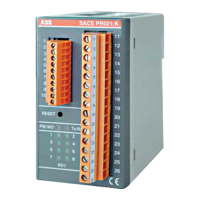
The PR021/K unit can be reset by pressing the ‘Reset’ push-button on the front panel of the unit (see par. 3.1).
This type of reset restarts the Sw of the PR021/K unit (the data stored in the RAM are erased).
4.2. Reset signals
“Reset signals” causes the internal relays (K51/1...8) to be returned to their rest condition (contact open).
If the “AUTOMATIC RESET” function is not selected, to reset the signals, proceed as follows:
- carry out a reset (see par. 4.1), if the applicable scenario is “PR021/K in Master mode” (see par. 1.2)
- send a “Trip Reset “ command from the remote supervision system
- carry out a reset (see par. 4.1), if the applicable scenario is “PR021/K in Slave mode” (see par. 1.2), on the Emax series
protection unit (PR112 or PR113).
If the “AUTOMATIC RESET” function is selected, to reset the signals simply carry out a trip reset on the protection unit
and the signals on the PR021/K unit will also be reset automatically.
4.3. Self-test function
To carry out the self-test, dip-switch no. 1 must be set to ON (see par. 5.3) then the reset push-button is pressed.
The self-test switches all 8 internal relays of the unit in sequence, and activates the related indicator LED
K51/1...K51/8 (see par. 3.2).
The Tx/Rx LED lights on each switching, and once the self-test is finished, it will flash according to the indications listed
in par. 3.2.
The self-test takes approx. 10s, thereafter the SACE PR021/K unit automatically returns to normal operation.
N.B. If dip-switch no. 1 is ON, the Self-test function is also activated when the PR021/K unit is powered on.
4.4. Stand-by function
To select the Stand-by mode, dip-switch no. 8 must be set to ON (see par. 5.3) then the reset push-button is pressed;
in this operating mode, the internal relays of the unit will not be switched (but the related indicator LEDs K51/1...K51/8
will still light).
While operating in Stand-by mode, the Tx/Rx LED will flash according to the instructions listed in par. 3.2.
This function is used when the protection unit is being tested (for example with PR010/T unit) and switching of the relays
of the PR021/K unit is not desired.
N.B. If dip-switch no. 8 is ON, the Stand-by function is also activated when the PR021/K unit is powered on.


 To Next Page