Pg 15 of 32
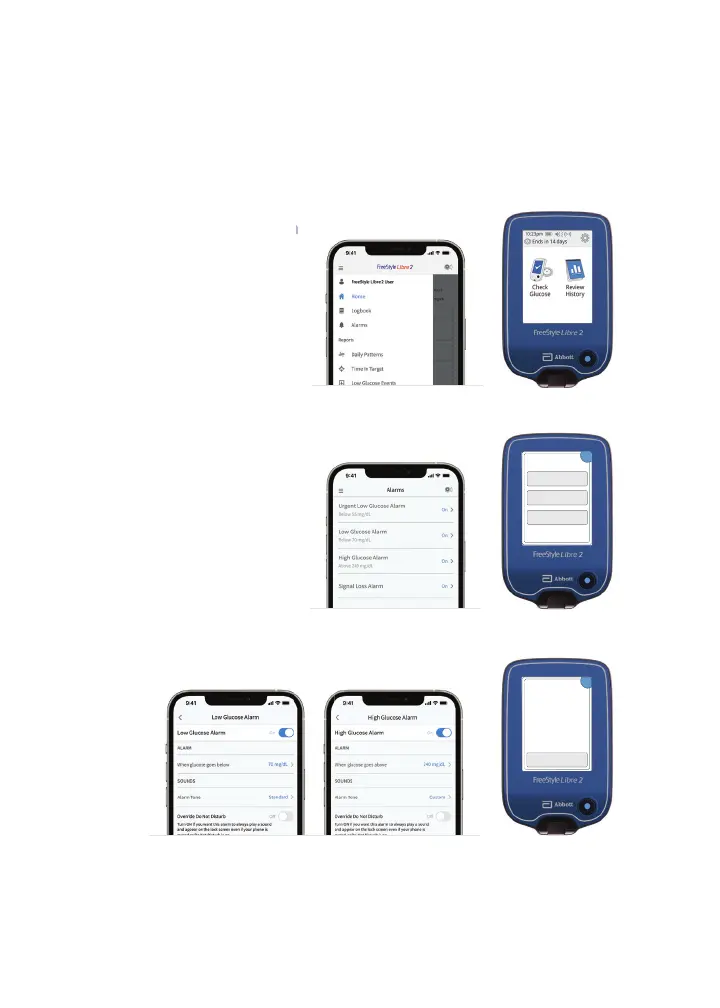
Customize Alarms
*
The FreeStyle Libre 2 app is only compatible with certain mobile devices and operating systems. Please check our website for more
information about device compatibility before using the app. Use of the FreeStyle Libre 2 app requires registration with LibreView.
*Notifi cations will only be received when alarms are turned on and the sensor is within 20 feet unobstructed of the reading device. You must
enable the appropriate settings on your smartphone to receive alarms and alerts, see the FreeStyle Libre 2 User’s Manual for more information.
Reference: 1. Data on fi le. Abbott Diabetes Care.
Alarms
*
are easy to set based on your target glucose goal.
Glucose alarms can be customized to di erentiate from the
mandatory alarm (below 55mg/dL).
01 Tap the Menu icon
02 Tap Alarms, then Change
Alarm Settings
OK
Low Glucose Alarm
High Glucose Alarm
Signal Loss Alarm
Change Alarm
Settings
03 Set Low and High Glucose Alarms
Change Alarm Settings
Alarm Settings
Low Glucose 70 mg/dL
High Glucose 240 mg/dL
Signal Loss On
OK














 To Next Page