Pg 18 of 32
New iOS 15 Feature:
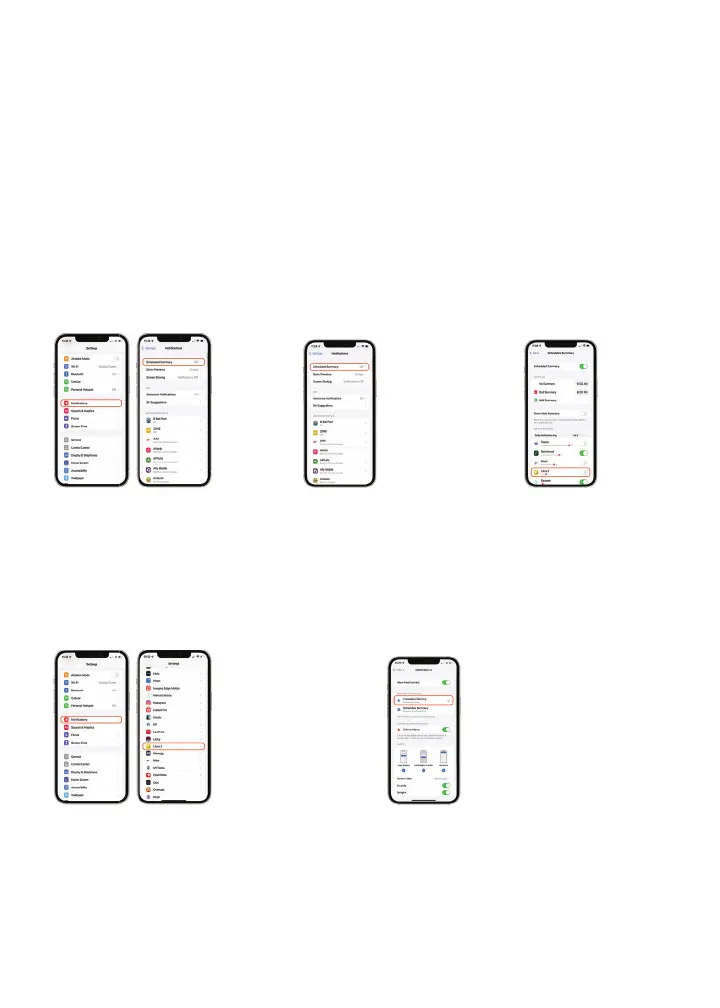
Notifi cation Summary
To help reduce distraction, Apple has redesigned
notifi cations to be collected and delivered at times that
are convenient for you. If you use the new Notifi cation
Summary, here’s how to confi gure your iPhone.*
Medicare coverage is available for the FreeStyle Libre 2 system if a compatible smartphone is used in conjunction with the FreeStyle Libre
2 reader to review glucose data. Medicare and other third party payor criteria apply. As a courtesy, Abbott provides the most up-to-date
information available, but it is subject to change and interpretation. The customer is ultimately responsible for determining the appropriate
codes, coverage, and payment policies for individual patients. Abbott does not guarantee third party coverage or payment for our products
or reimburse customers for claims that are denied by third party payors.
*The FreeStyle Libre 2 app is only compatible with certain mobile devices and operating systems. Please check our website for more
information about device compatibility before using the app. Use of the FreeStyle Libre 2 app requires registration with LibreView.
Turn o the app in the “Apps in Summary” list
01
Open Settings
Tap Notifications
Tap Scheduled Summary
01
Open Settings
Tap Notifications
Locate and tap
the App
02
Select
Immediate
Delivery
02
Turn on Scheduled
Summary to make
changes to the
settings here
03
Locate the App
Toggle the App Off
Set app notifi cations to “Immediate Delivery”














 To Next Page