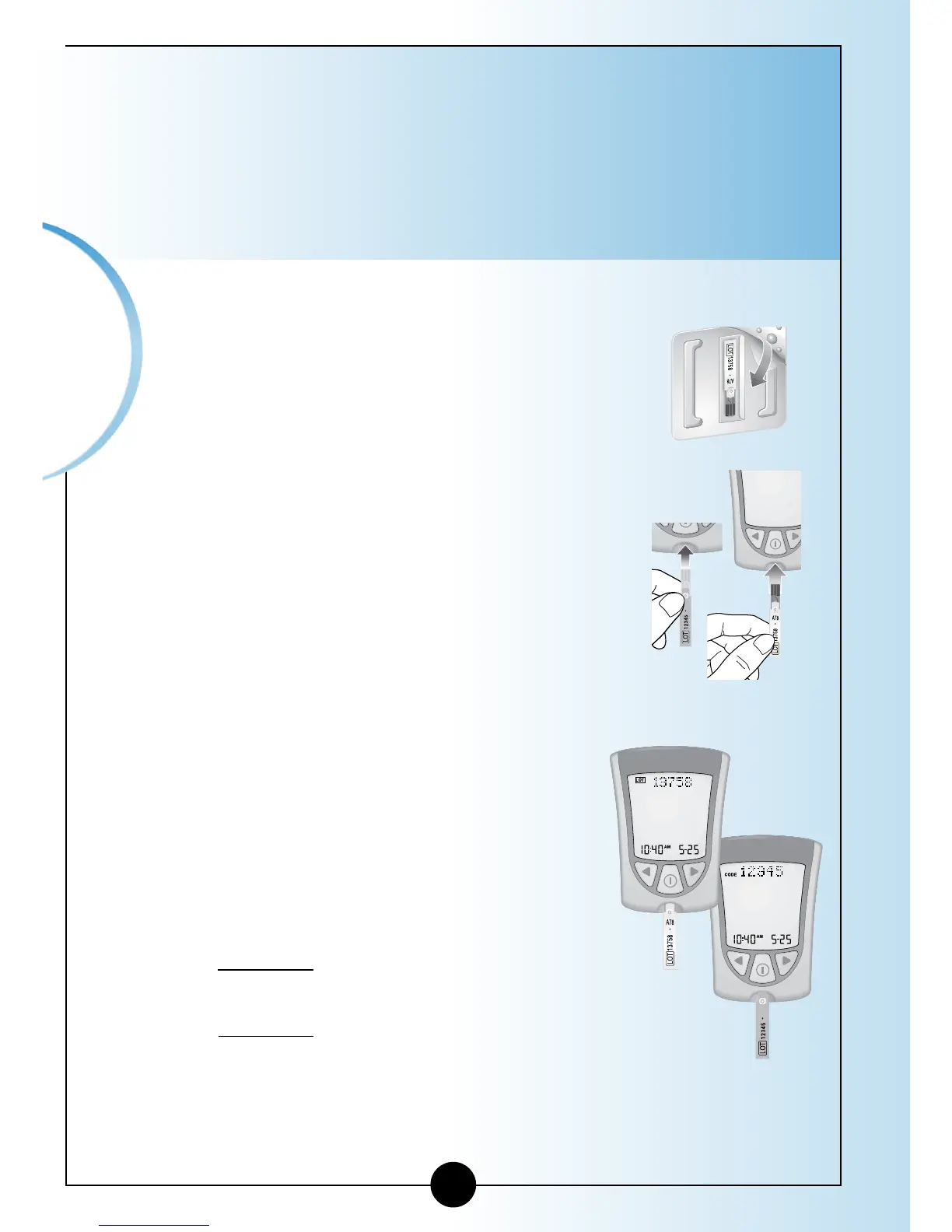
IMPORTANT: Use only the calibrator that is packaged in
the box of test strips you are using.
Do not use test strips that have expired. Check the
expiration date on the test strip foil packet and test strip
box. If only the year and month are shown, the expiration
date is the last day of the month.
1
Remove the glucose or β-Ketone calibrator package
from the new box of test strips.
2
Open the calibrator package. Find the
three raised bumps on the calibrator
package. Peel the clear cover away from
the three raised bumps.
3
Hold the calibrator (white for glucose and
purple for blood β-Ketone) with the LOT
number facing you.
4
Insert the calibrator into the strip
port. Push it in until it stops.
The Display Check shows on the
display window, followed by the
time, month, and day.
Next, the LOT number shows on the
display window.
a. Example of glucose
LOT number: LOT 13758
b. Example of β-Ketone
LOT number: CODE 12345
Then you hear the beeper, if the
beeper is ON.
15
Calibrating
Your Monitor
Glucose
β-Ketone














 To Next Page