Hardware Setup
IP35/IP35-E 1-19
1.10 Connecting Rear Panel I/O Devices
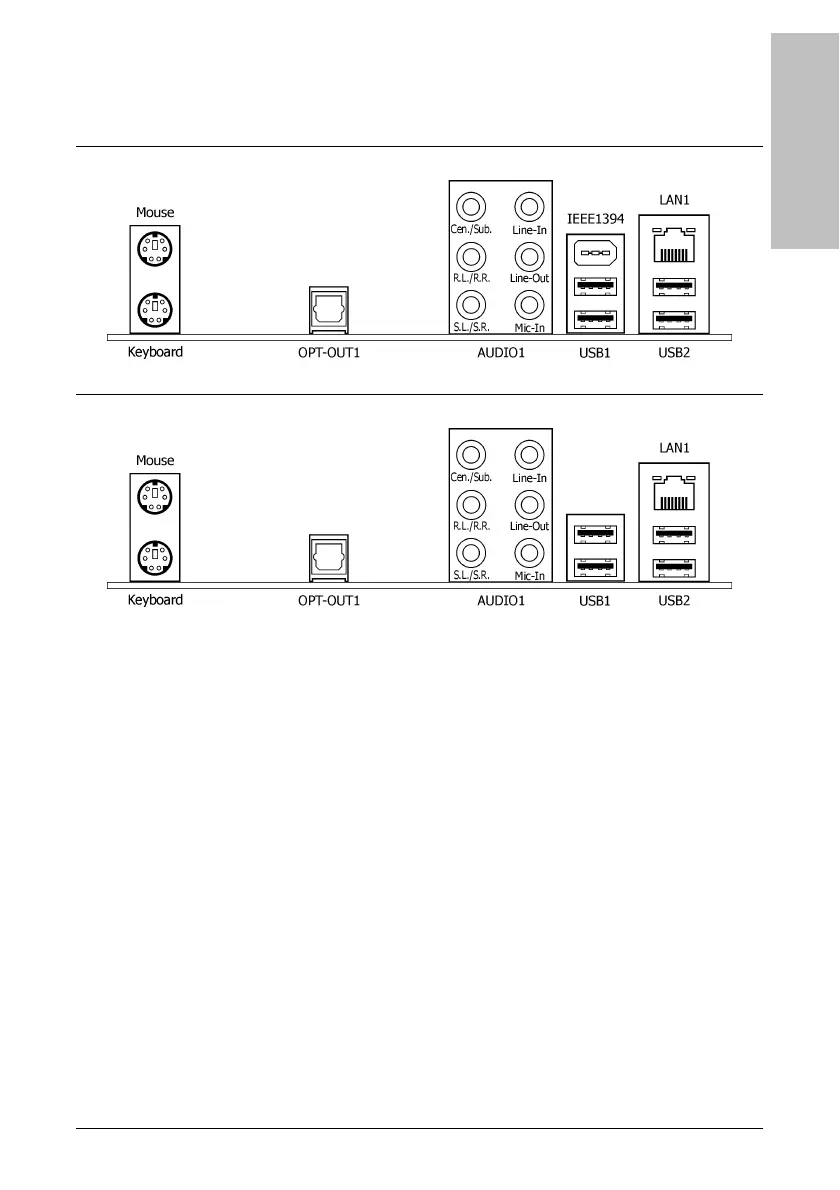
The rear I/O part of this motherboard provides the following I/O ports:
IP35
IP35-E
• Mouse: Connects to PS/2 mouse.
• Keyboard: Connects to PS/2 keyboard.
• OPT-OUT1: This connector provides an S/PDIF-Out connection through optical fiber to
digital multimedia devices.
• AUDIO1:
Cen./Sub. (Center / Subwoofer): Connects to the center and subwoofer channel.
R.L./R.R. (Rear Left / Rear Right): Connects to the rear left and rear right channel.
S.L./S.R. (Surround Left / Surround Right): Connects to the surround left and
surround right channel.
Line-In: Connects to the line out from external audio sources.
Line-Out: Connects to the front left and front right channel.
Mic-In: Connects to the plug from external microphone.
• IEEE 1394: Connects to devices of IEEE 1394 protocol.
(For IP35 only)
• LAN1: Connects to Local Area Network.
• USB1/USB2: Connects to USB devices such as scanner, digital speakers, monitor, mouse,
keyboard, hub, digital camera, joystick etc.



 To Next Page