Hardware Setup
IP35 Pro 1-21
1.10 Connecting Rear Panel I/O Devices
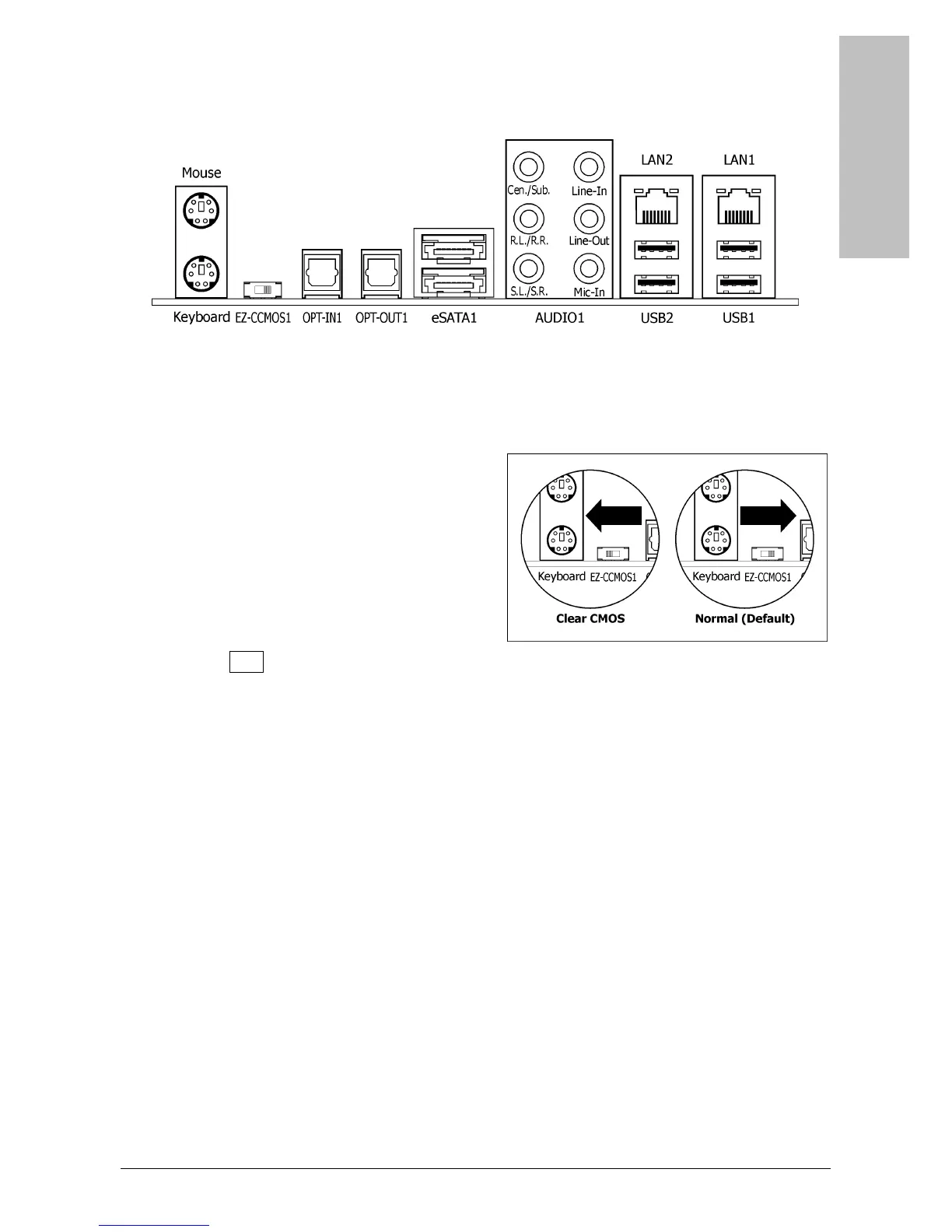
The rear I/O part of this motherboard provides the following I/O ports:
• Mouse: Connects to PS/2 mouse.
• Keyboard: Connects to PS/2 keyboard.
• EZ-CCMOS1: This switch enables clearing the CMOS memory without uncovering the
system chassis.
To clear the CMOS memory by
EZ-CCMOS1:
Step 1: Power off the system.
Step 2: Turn left this switch to the “Clear
CMOS” position.
Step 3: Turn right this switch to its default
“Normal” position. The default CMOS
memory is now reloaded.
※ The C.C. POST Code appears when either the external “EZ-CCMOS1” switch
or the internal “CCMOS1” jumper is not set to its normal position.
• OPT-IN1: This connector provides an S/PDIF-In connection through optical fiber from
digital multimedia devices.
• OPT-OUT1: This connector provides an S/PDIF-Out connection through optical fiber to
digital multimedia devices.
• eSATA1: This connector supports the external SATA connection.
• AUDIO1:
Cen./Sub. (Center / Subwoofer): Connects to the center and subwoofer channel.
R.L./R.R. (Rear Left / Rear Right): Connects to the rear left and rear right channel.
S.L./S.R. (Surround Left / Surround Right): Connects to the surround left and
surround right channel.
Line-In: Connects to the line out from external audio sources.
Line-Out: Connects to the front left and front right channel.
Mic-In: Connects to the plug from external microphone.
• LAN1/LAN2: Connects to Local Area Network.
• USB1/USB2: Connects to USB devices such as scanner, digital speakers, monitor, mouse,
keyboard, hub, digital camera, joystick etc.



 To Next Page