EasyManua.ls Logo

Abit KN9S - Serial ATA Connectors

Abit KN9S
72 pages
Print Icon
To Next Page IconTo Next Page
To Previous Page IconTo Previous Page
Loading...
Hardware Setup
KN9 SLI, KN9 Ultra, KN9S 2-17
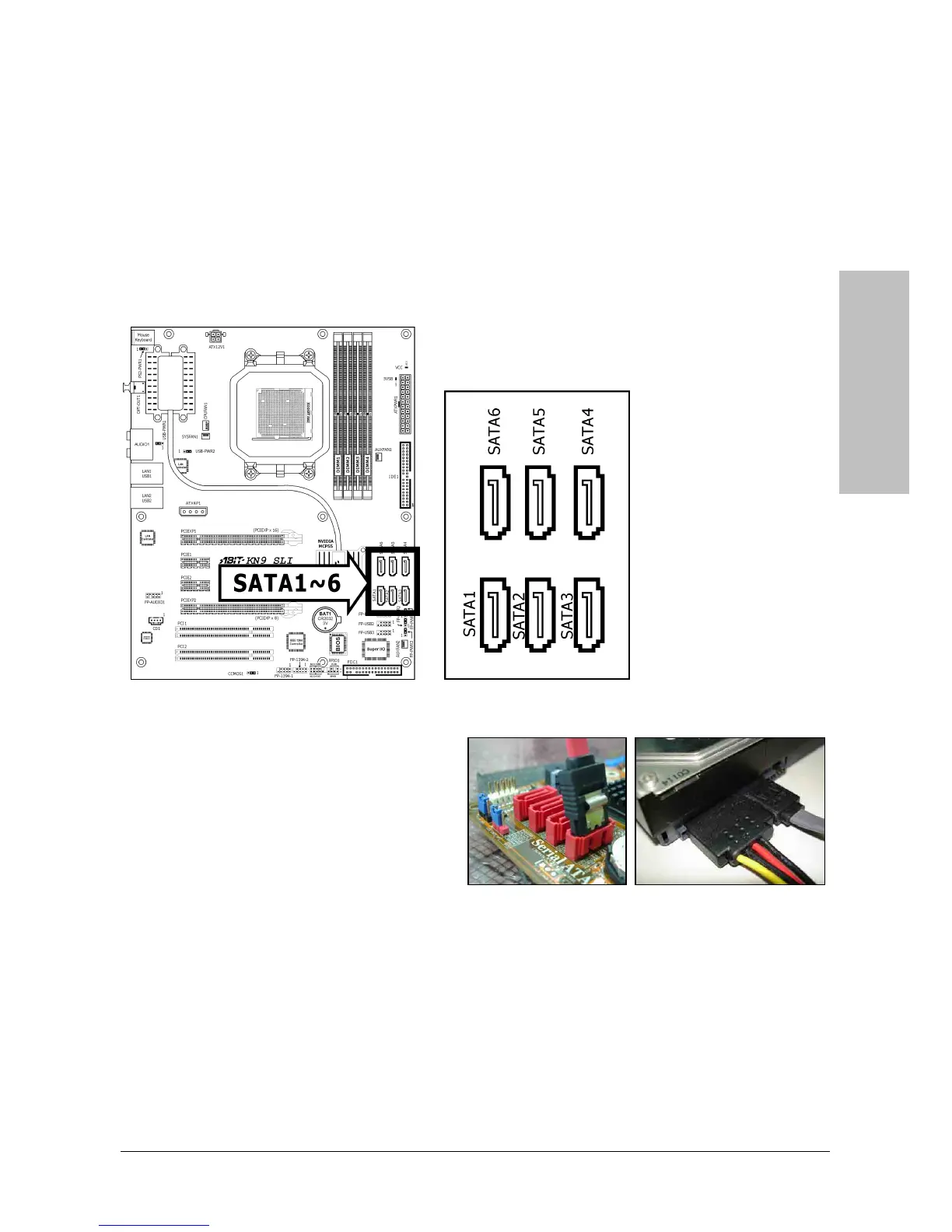
2.6.2 Serial ATA Connectors
Each SATA connector serves as one single channel to connect one SATA device by a thin SATA
cable.
The RAID 0/1/0+1/5/JBOD configuration is also possible through the combination of disk arrays
through these SATA connectors:
Both SATA 5 and SATA 6 are available only for models “KN9 SLI” and “KN9
Ultra”.
To connect SATA device:
1.

A
ttach either end of the si
g
nal cable to
the SATA connector on motherboard.
Attach the other end to SATA device.
2.
A
ttach the SATA power cable to the
SATA device and connect the other end
from the power supply.

Table of Contents

Related product manuals