Hardware Setup
KN9 SLI, KN9 Ultra, KN9S 2-23
2.8 Connecting I/O Devices
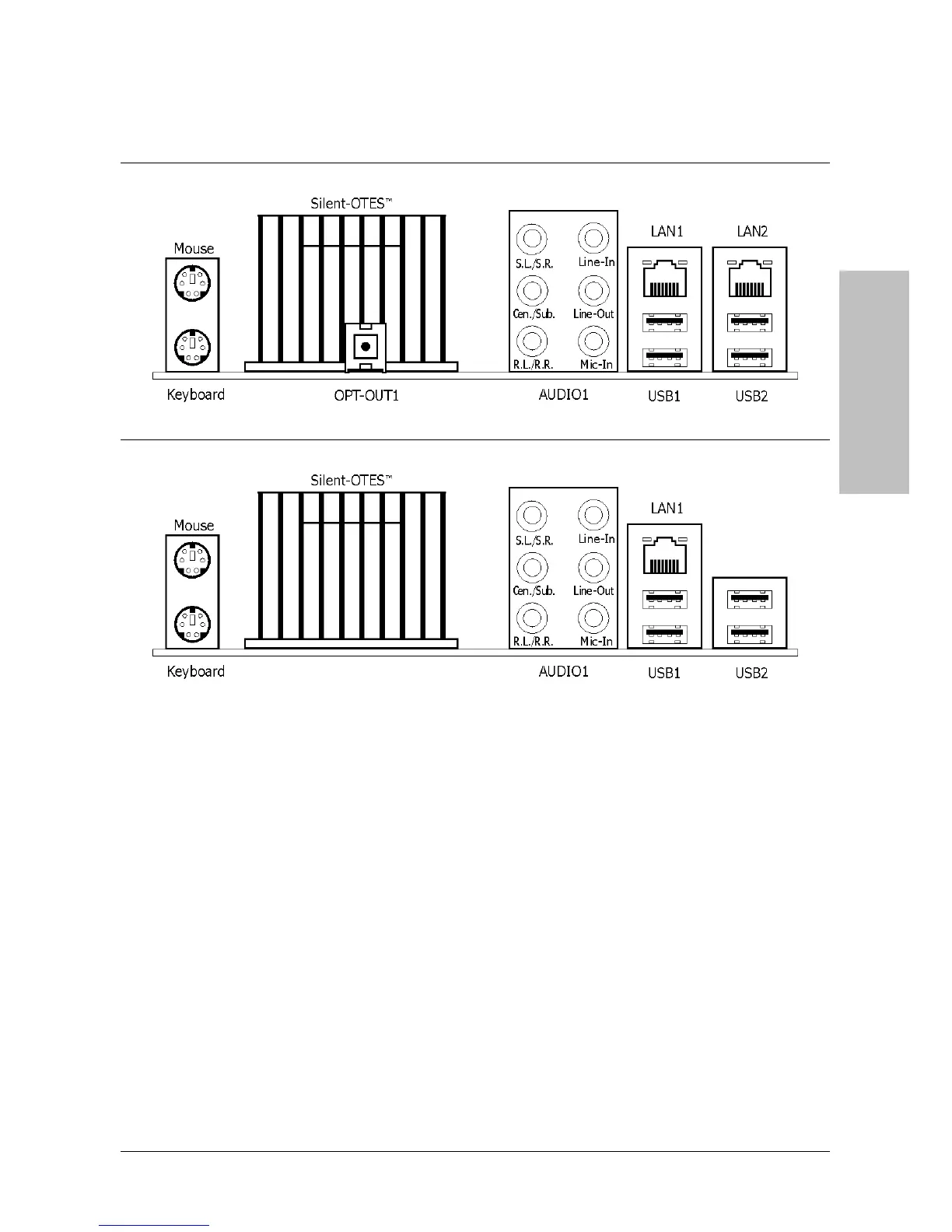
KN9 SLI, KN9 Ultra
KN9S
• Mouse: Connects to PS/2 mouse.
• Keyboard: Connects to PS/2 keyboard.
• Silent OTES
™
: The Silent OTES
™
(Silent Outside Thermal Exhaust System) is a device
specifically designed to silently cool the motherboard's North Bridge chipset.
(Keep the area for outgoing heat wave open.)
• OPT-OUT1: This connector provides an S/PDIF-Out connection through optical fiber to
digital multimedia devices. (For model “KN9 SLI” and “KN9 Ultra” only)
• AUDIO1:
S.L./S.R. (Surround Left / Surround Right): Connects to the surround left and
surround right channel in the 7.1 channel audio system.
Cen./Sub. (Center / Subwoofer): Connects to the center and subwoofer channel in the
7.1 channel audio system.
R.L./R.R. (Rear Left / Rear Right): Connects to the rear left and rear right channel in
the 7.1 channel audio system.
Line-In: Connects to the line out from external audio sources.


 To Next Page