BIOS Setup 3-13
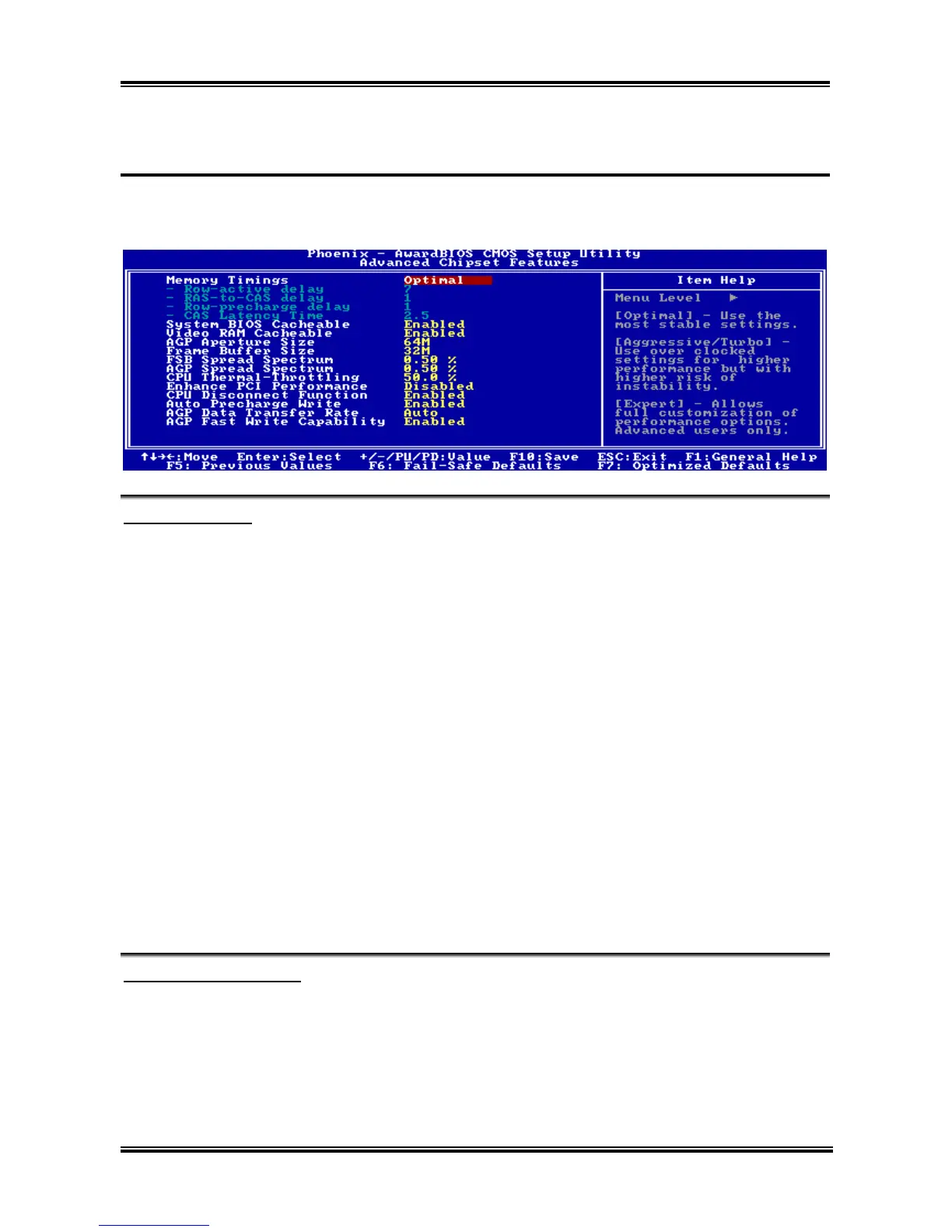
3-4. Advanced Chipset Features
For NF7/NF7-S/NF7-M:
Memory Timings:
Five options are available: Optimal Aggressive Turbo By SPD Expert. The default setting is
Optimal. Choose Optimal for better memory compatibility; choose Aggressive/Turbo for better memory
performance; choose Expert for user-define. When set to By SPD, the BIOS will read the DRAM module
SPD data and automatically set to the values stored in it.
Row-active delay:
Fifteen options are available: from 1 to 15. This option specifies the row active time. This is the minimum
number of cycles between an activate command and a precharge command to the same bank.
RAS-to-CAS delay:
Seven options are available: from 1 to 7. This item is to set SDR/DDR SDRAM RAS to CAS delay. It
can define the SDRAM ACT to Read/Write command period.
Row-precharge delay:
Seven options are available: from 1 to 7. This item controls the idle clocks after issuing a precharge
command to the DRAM.
CAS Latency Time:
Three options are available: 2.0 2.5 3.0. The default setting is 2.5. You can select SDRAM CAS
(Column Address Strobe) latency time according your SDRAM specification.
System BIOS Cacheable:
Two options are available: Disabled or Enabled. The default setting is Enabled. When you select Enabled,
you get faster system BIOS executing speed via the L2 cache.
User’s Manual



 To Next Page