BIOS Setup 3-7
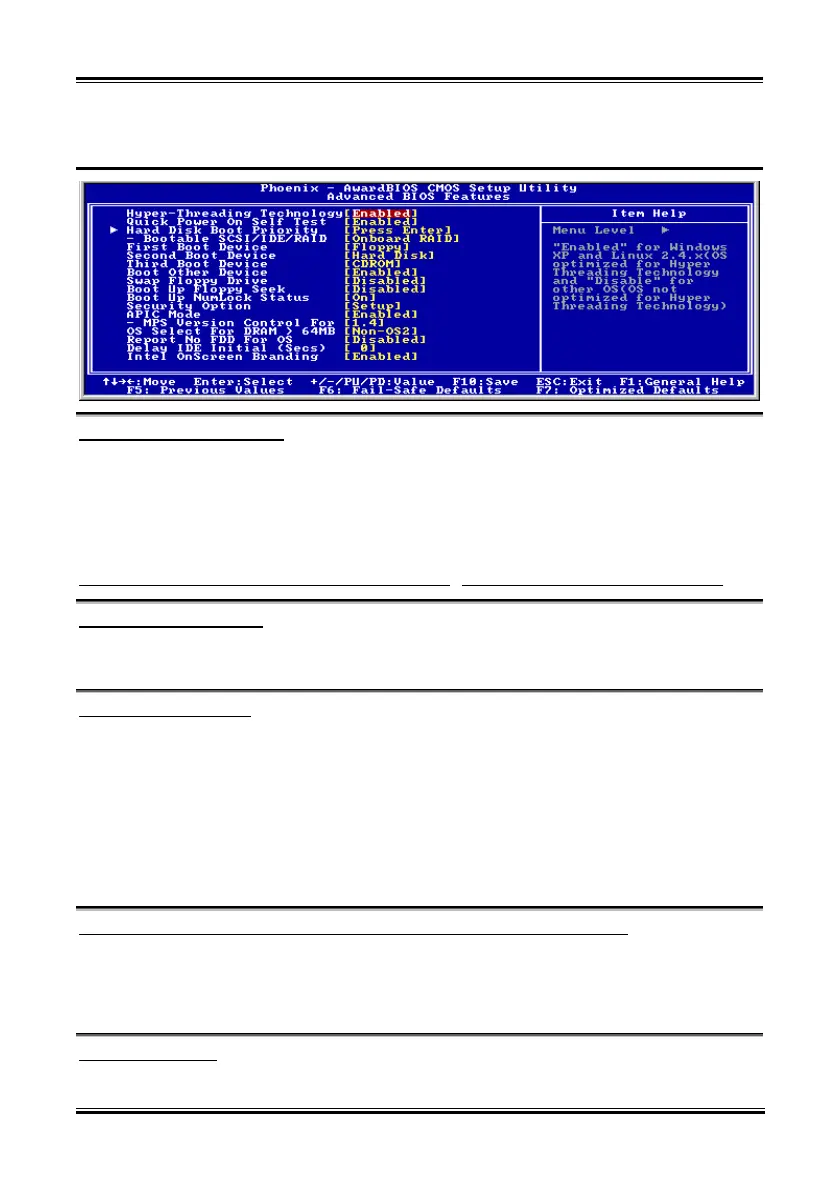
3-3. Advanced BIOS Features
Hyper-Threading Technology
This option enables or disables the processor’s Hyper-Threading Technology
Leave this item to its default setting to enable the simultaneous multi-threaded (SMT) processor so as to
make one physical processor looks like two logical processors to the OS and applications.
This option is for CPU with Hyper-Threading Technology only. For more information on
“Hyper-Threading Technology”, please visit Intel Web site at
http://www.intel.com/homepage/land/hyperthreading.htm
, http://www.intel.com/design/chipsets/ht/.
Quick Power On Self Test:
When set to [Enabled], this item speeds up the Power On Self Test (POST) after powering on the system.
The BIOS shorten or skip some check during the POST.
Hard Disk Boot Priority:
This item selects the hard disks booting priority. By pressing <Enter> key, you can enter its submenu
where the hard disks detected can be selected for the booting sequence to boot up system.
This item functions only when there is the option of [Hard Disk] in any one of the First/Second/Third
Boot Device items.
Bootable SCSI/IDE/RAID:
This item determines the bootable device from [Onboard RAID] or [PCI Slot Device] when the [Hard
Disk Boot Priority] item is set to [Bootable SCSI/IDE/RAID Cards].
First Boot Device / Second Boot Device / Third Boot Device / Boot Other Device:
Select the drive to boot first, second and third in the [First Boot Device], [Second Boot Device], and
[Third Boot Device] items respectively. The BIOS will boot the operating system according to the
sequence of the drive selected. Set [Boot Other Device] to [Enabled] if you wish to boot from another
device other than these three items.
Swap Floppy Drive:
When set to [Enabled], and the system is booting from the floppy drive, the system will boot from drive B
User’s Manual



 To Next Page