3-14 Chapter 3
[Mode 0-4]: You can select a mode that matches your disk drive’s timing. Do not use the wrong setting
or you will have drive errors.
Master/Slave Drive Ultra DMA
This item allows you to set the Ultra DMA in use.
[Auto]: The BIOS will select the best available option after checking your hard drive or CD-ROM.
[Disabled]: The BIOS will not detect these categories. If problem arises in using Ultra DMA devices, try
disabling this item.
Onboard IDE-2 Controller:
The description is same as the Onboard IDE-1 Controller.
Back to Integrated Peripherals Setup Menu:
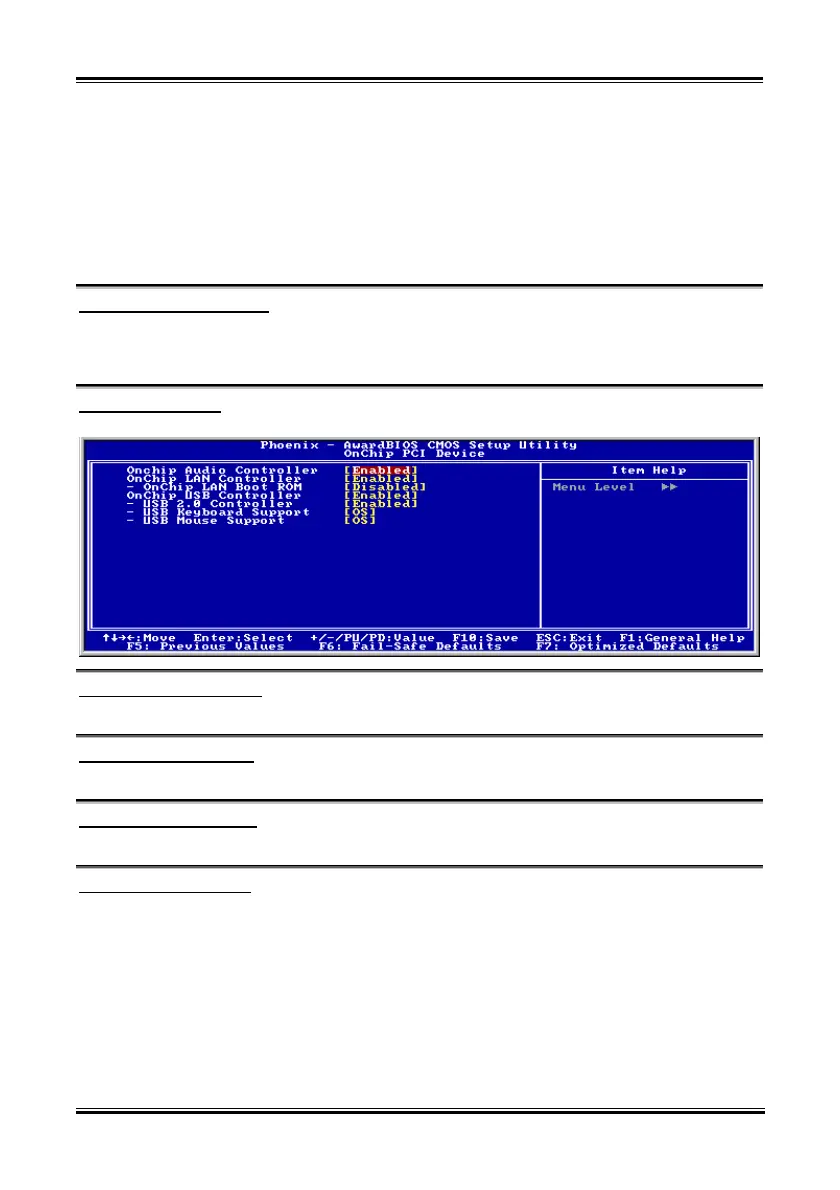
OnChip PCI Device:
Click <Enter> key to enter its submenu:
OnChip Audio Controller:
This option enables or disables the audio controller.
OnChip LAN Controller:
This option enables or disables the LAN controller.
OnChip LAN Boot ROM:
This item enables or disables the Boot ROM on LAN controller.
OnChip USB Controller:
This option enables or disables the USB controller.
USB 2.0 Controller:
This option enables or disables the USB 2.0 controller.
USB Keyboard Support:
This item allows you to select [BIOS] for using USB keyboard in DOS environment, or [OS] in OS
environment.
VI7



 To Next Page