Installing the VIA PCI Audio Driver for Windows
®
98 SE B-3
User’s Manual
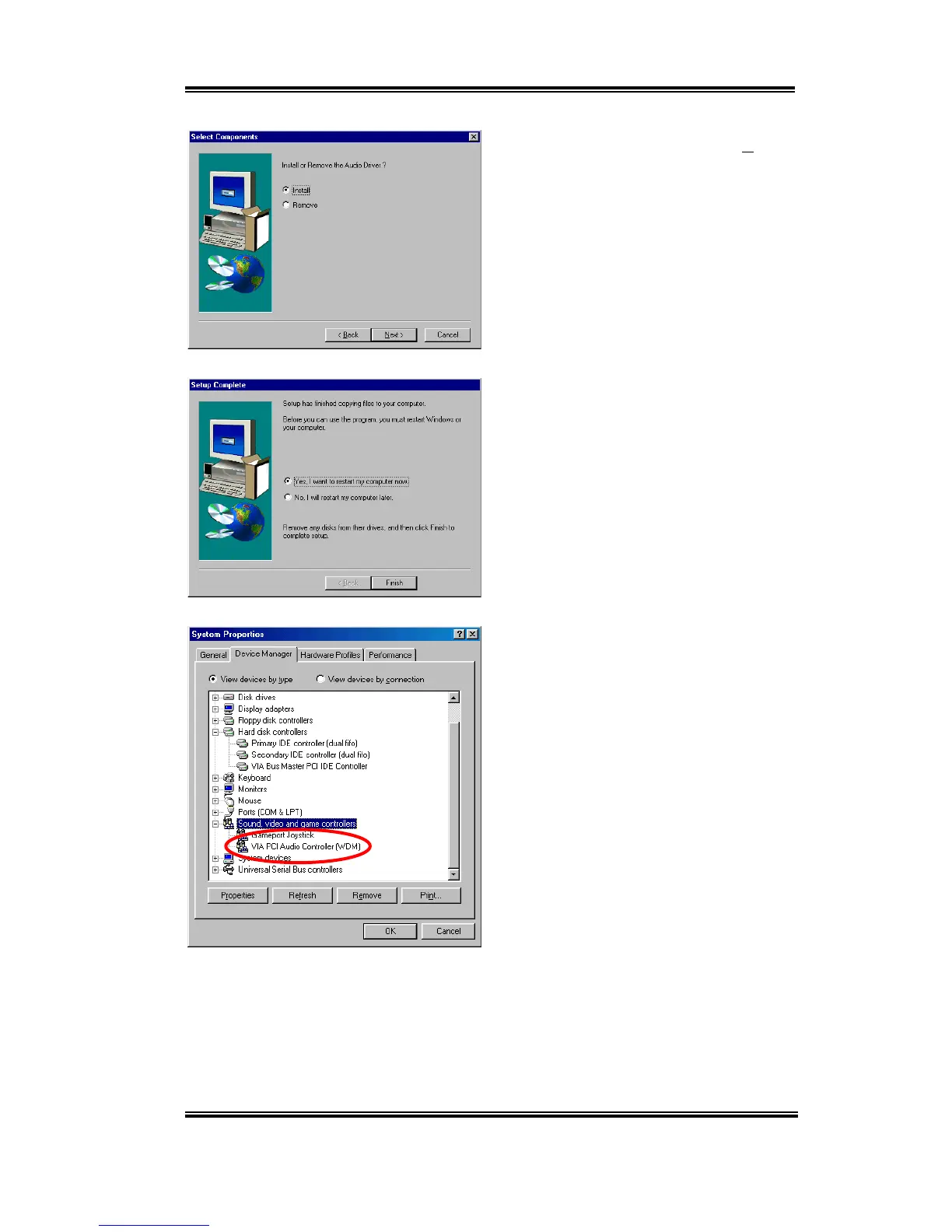
Choose “
Install
” and then click the “
Next>
”
button to go on.
Program will start to install all drivers you
choose.
When installation is complete, the installer
will ask you to restart your computer. We
suggest you choose “
Yes, I want to restart
my computer now
” and then click the
“
Finish
” button to restart your computer to
finish the drivers update.
When Windows restarts, it will ask you to
put the Windows
®
98 SE CD into the CD-
ROM drive. Put the Windows
®
98 SE CD
into the drive and follow the instructions to
proceed.
When the update is finished, go to
System
Properties '
Device Manager
'
Sound,
Video and game controllers
. Your system
should now show “
VIA PCI Audio
Controller (WDM)
” is there instead.



 To Next Page