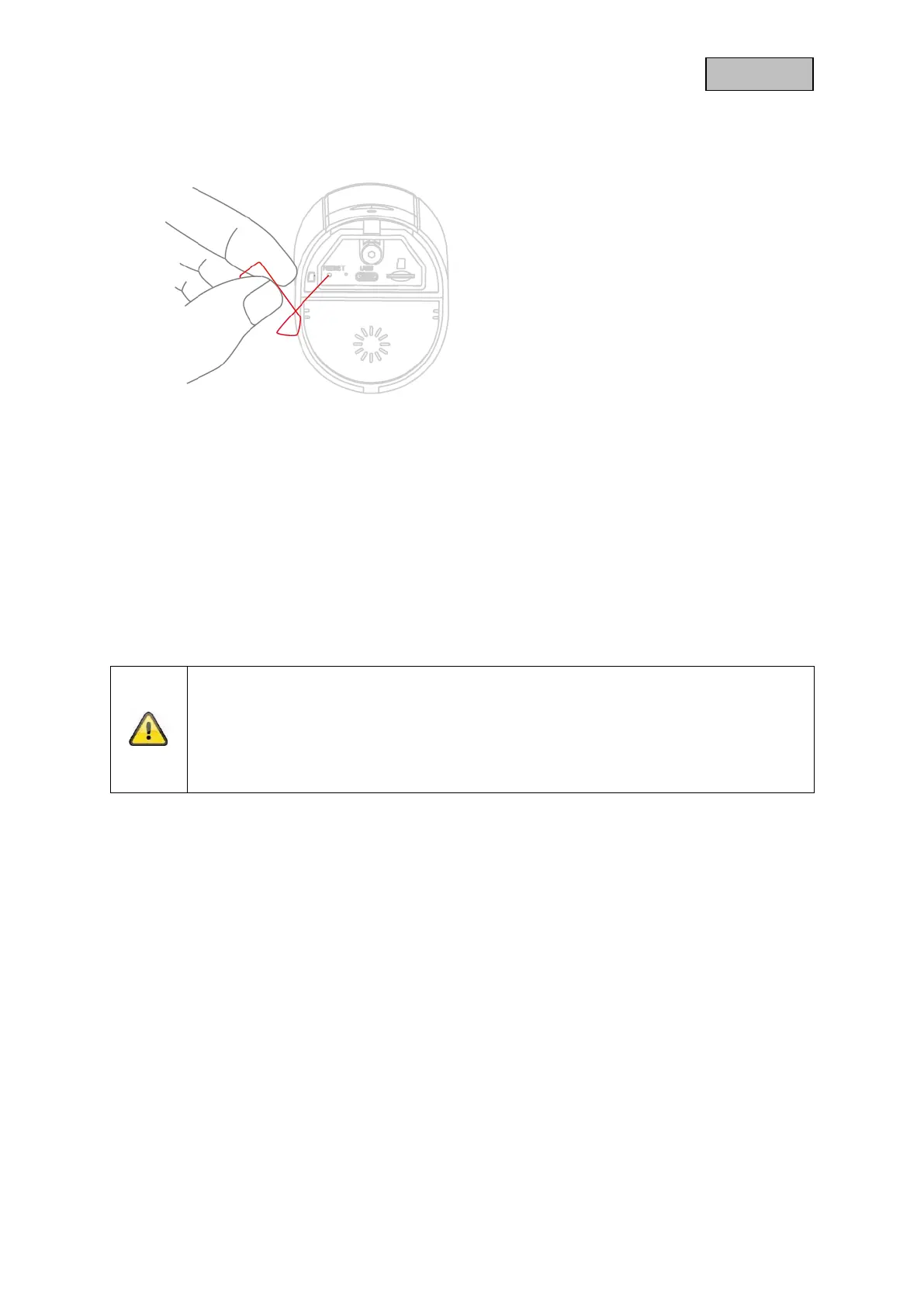
5. Restore factory settings
If there are any difficulties during setup or if you have
forgotten the access data (admin password and/or
security code), reset the camera to factory settings:
Open the bottom cover of the camera using an Allen
key and press the reset button using a thin object (e.g.
the microSD card removal tool or a paper clip) for at
least 5 seconds until the status LED flashes.
6. Installation instructions Wi-Fi operation
When installing the camera, make sure that it is within optimal range of the router. The camera can
only be accessed if there is a sufficient Wi-Fi signal to the router.
For installations in larger objects, a Wi-Fi repeater is recommended to optimize the range. Optionally,
you can also operate the camera via LAN.
Please note that structural conditions can influence the transmission.
Note
Information about compatible Wi-Fi repeaters can be obtained from your network operator
or the manufacturer of your router. ABUS Security Center GmbH & Co. KG will not make
any recommendations for Wi-Fi repeaters.
Pay close attention to the installation recommendations of the Wi-Fi repeater. The
positioning should ideally be between the router and the camera.


 To Next Page