Menu
22
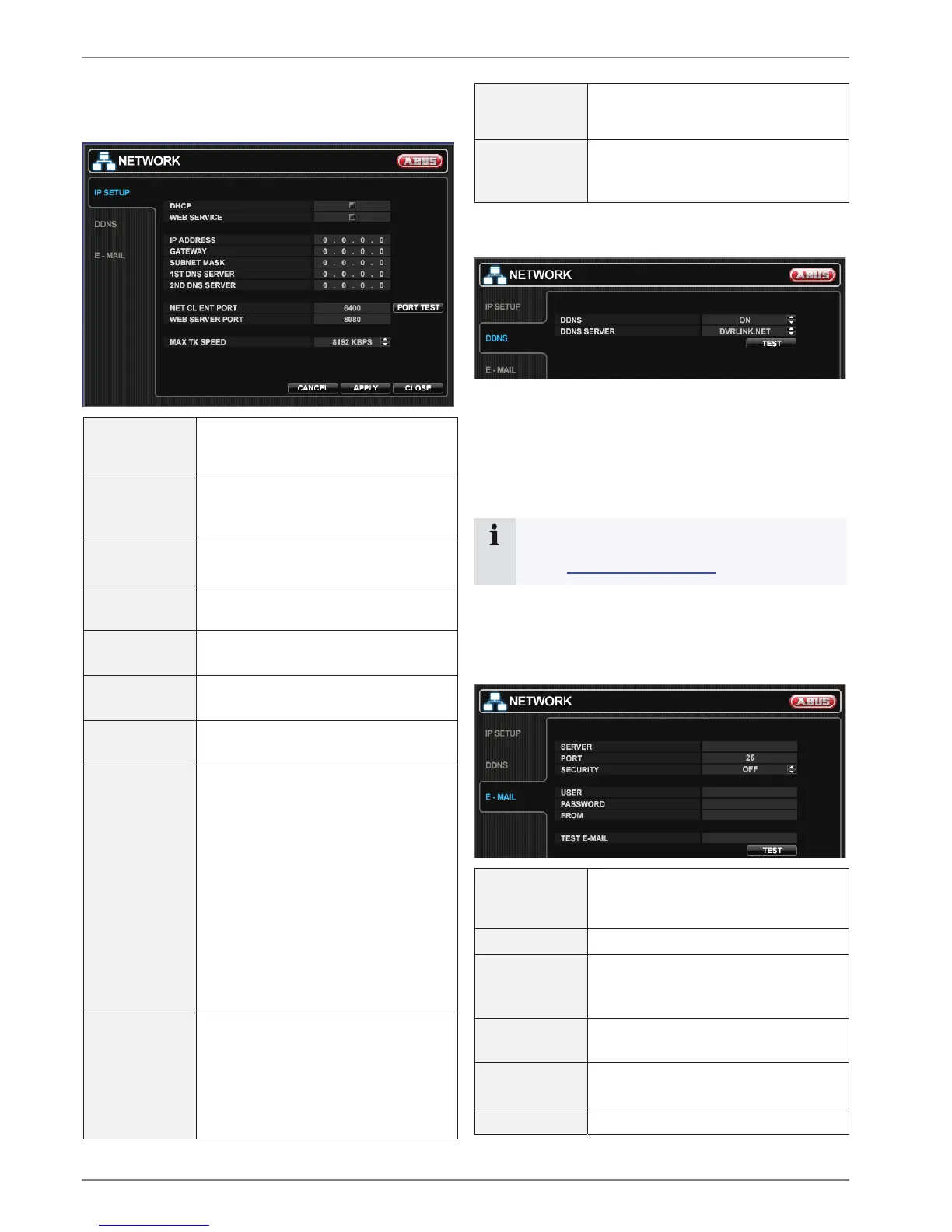
NETWORK
IP SETUP
DHCP
When enabled, the DVR will obtain an
IP address automatically if it is con-
nected to a DHCP server or router.
WEB SERVICE When enabled remote network con-
nections using Internet Explorer is al-
lowed.
IP ADDRESS If DHCP is not being used, the IP ad-
dress can be manually set.
GATEWAY If DHCP is not being used, the gate-
way IP address can be manually set.
SUBNET MASK If DHCP is not being used, the subnet
mask can be manually set.
1
ST
DNS
SERVER
If DHCP is not being used, the first
DNS server can be manually set.
2
ND
DNS
SERVER
If DHCP is not being used, the second
DNS server can be manually set.
RTSP
SERVICE
PORT
RTSP stands for Real Time Stream
Protocol. Current video players and
also media players can stream chan-
nels directly. You need to enter the
stream as below:
rtsp://IP-address:RTSP port/
e.g. rtsp://192.168.178.105:554/
If connected router supports UPNP
(Universal plug and play) function,
port forwarding is automatically setup
when pressing AUTO PORT.
Furthermore the port can be deleted or
tested.
WEB SERVER
PORT
The port number that the DVR uses to
support remote connection from Inter-
net Explorer.
If connected router support UPNP
(Universal plug and play) function,
port forwarding is automatically setup
when pressing AUTO PORT.
Furthermore the port can be deleted or
tested.
MAX TX
SPEED
Specifies the maximum bandwidth that
the DVR can use during a remote con-
nection.
DDNS
1. To use the ABUS DDNS function, you must first set
up an account at www.eytronserver.com. Please note
the FAQs on the website when doing this.
2. Activate the DDNS function by setting the DDNS field
to ON and choosing the ABUS SERVER.
3. Press the TEST button to test the functionality.
Note
Before testing the functionality an account and
DVR at www.eytronserver.com has to be set up.
Every minute the DVR will now updatet the IP-address
and port and you can easily access the DVR through
www.eytronserver.com.
E-Mail
SERVER
Enter here the SMTP outbound email
server that should be used to send
email notifications.
PORT The outbound email port number.
SECURITY Set to OFF if the SERVER does not
require a username and password to
connect.
USER Enter a username to identify the DVR
in email messages
PASSWORD If SECURITY is set to ON, enter the
password here.
FROM Input the E-mail address or any text. It



 To Next Page