Menu
21
USER
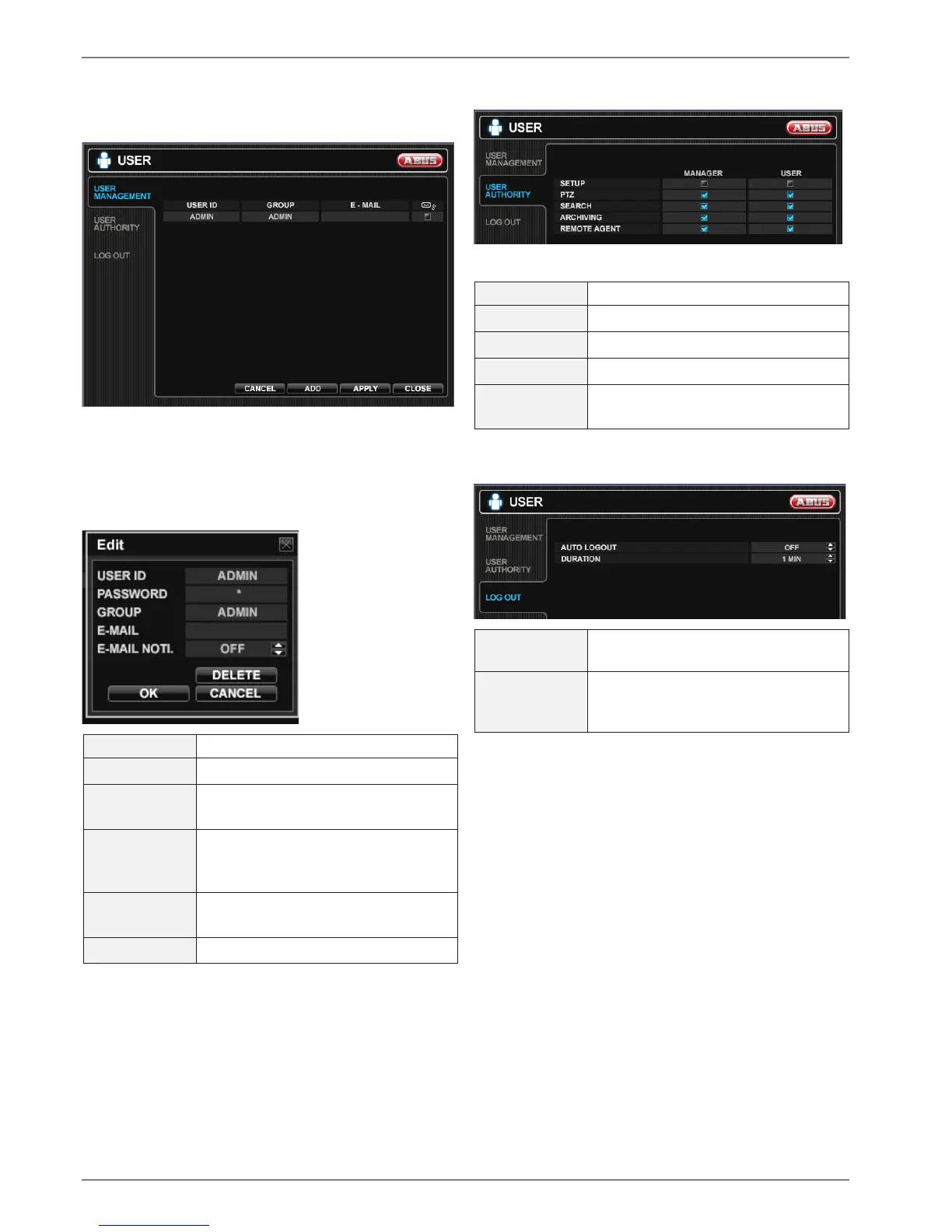
USER MANAGEMENT
Here you can manage up to 8 different users. The default
user is ADMIN and default password is ‚
1 2 3 4 5’.
Double-click the USER ID to change an existing user or
press ADD to create a new user.
USER ID
Enter a name (Max. 10 characters).
PASSWORD Password to perform different actions.
GROUP Users can belong to one of three
groups - ADMIN, MANAGER or USER.
E-MAIL Enter the users email address if email
notification is required (Max. 64 Char-
acters).
E-MAIL NOTI. Enable or disable email notifications
for this particular user.
DELETE Delete the current user.
USER AUTHORITY
Define the different rights for MANAGER and USER.
SETUP
Change settings.
PTZ Control PTZ cameras.
SEARCH Enter the SEARCH menu.
ARCHIVING Enter the ARCHIVING menu.
REMOTE
AGENT
Connect by network to the web server.
LOG OUT
AUTO
LOGOUT
Determines the AUTO LOGOUT
ON/OFF.
DURATION
In case of selecting AUTO LOGOUT
ON, determines the duration until log-
out.



 To Next Page