AC S.A. All rights reserved. Copying, publishing, distribution and any usage of the full or partial data included in the herewith document, particularly pictures, drawings, illustrations, trade marks etc. is
strictly prohibited under the law.
Page 22 of 54
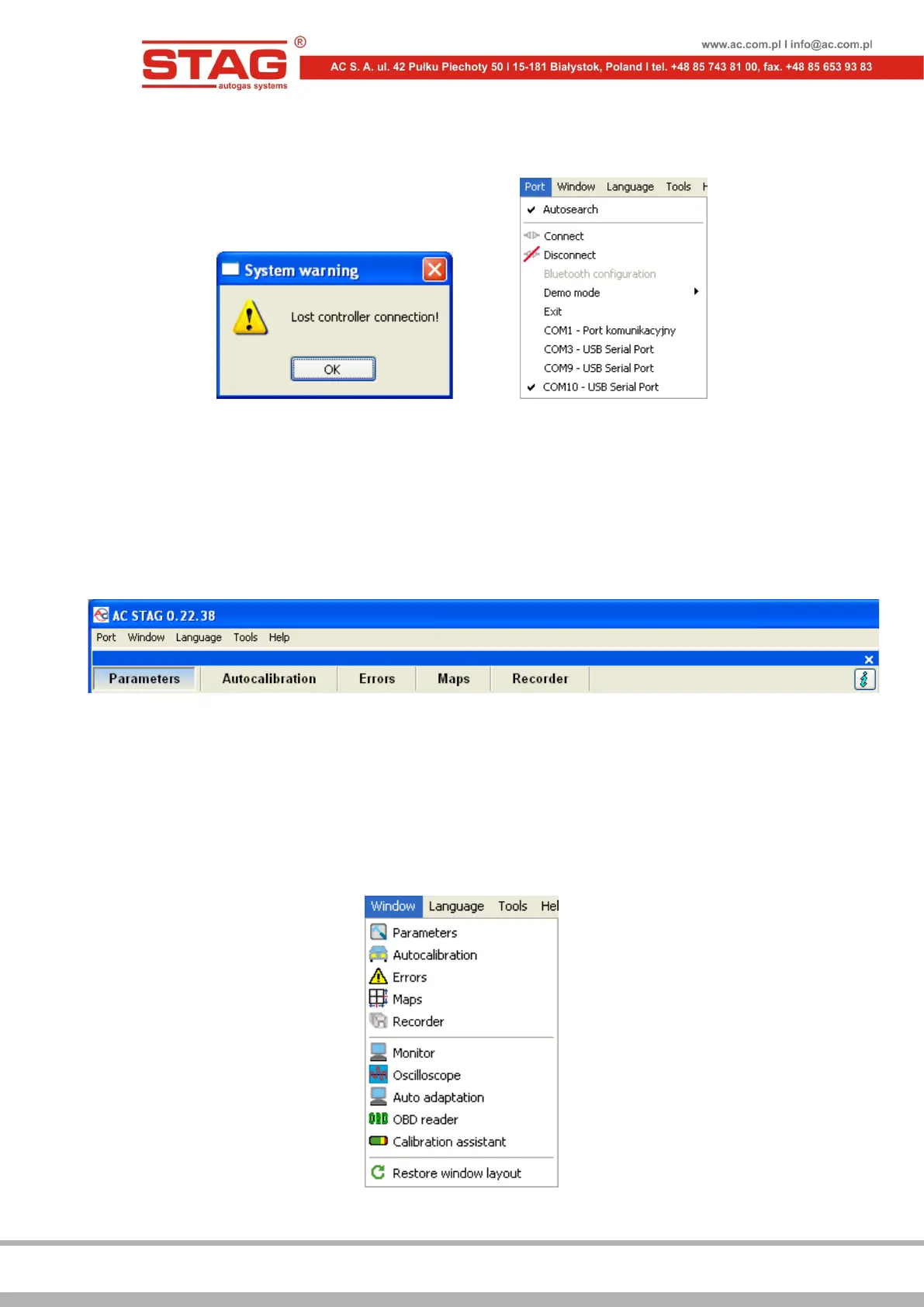
Select another port from the Port menu in the top section of the screen in the event the
application displays “NO LPG controller!” message.
Figure 2.1.3 “System warning” window and the “Port” tab in the Menu bar
2.1.2 Diagnostic software version
Once the diagnostic software has been started, AC STAG version will be visible on the bar located
in the top section of the screen. Figure 2.1.4 indicates version 0.22.38.
Figure 2.1.4 Main menu bars
2.1.3 Main menu
The main menu includes the following options:
• Port – enables one to change the communication port, establish and terminate
connection with the controller as well as activate the automatic connection detection
mode;
• Window – selection from among main windows of the application.
Figure 2.1.5 “Window” tab in the Menu bar


 To Next Page