AC S.A. All rights reserved. Copying, publishing, distribution and any usage of the full or partial data included in the herewith document, particularly pictures, drawings, illustrations, trade marks etc. is
strictly prohibited under the law.
Page 44 of 54
2.1.13 Autoadaptation
STAG 400 DPI controllers are provided with a mechanism that corrects gas dosing in real time,
during driving. Activation, selection of autoadaptation mode and configuration is performed in
the Autoadaptation window accessed through the Window menu. There are one mode available:
OBD – Correction of gas dosage is based on the readings of parameters from the
on-board diagnostic interface compliant with the OBD2/EOBD standard.
2.1.13.1 OBD mode
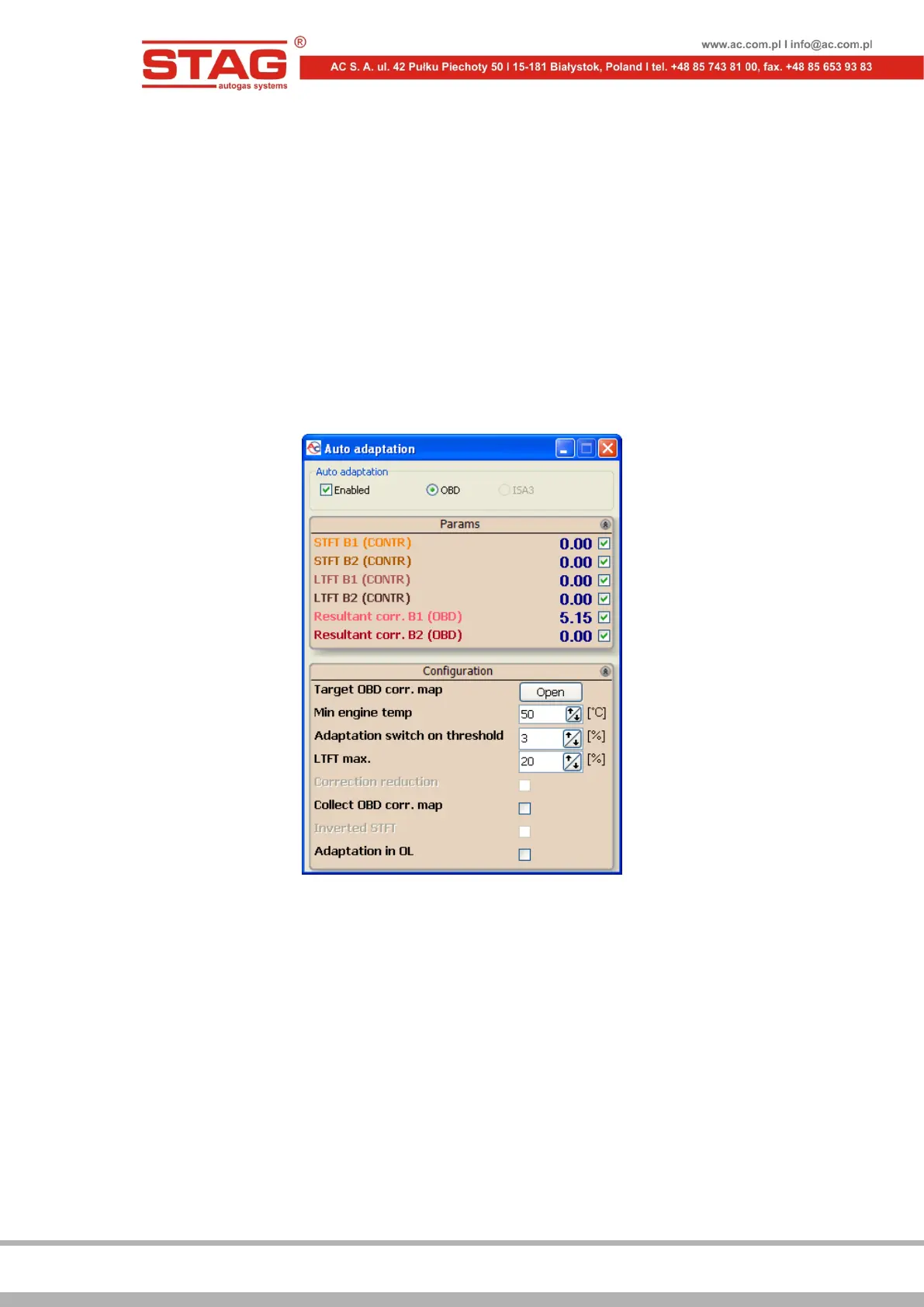
With OBD selected, the following settings and parameters can be configured and viewed:
Figure 2.1.33 Configuration of OBD adaptation
The map of OBD target corrections – Press the Open button to display the
configuration window, in which the resulting OBD corrections for each bank are
displayed as a map with rpm and negative pressure axes. Map content is also
automatically refreshed during controller autocalibration.
The minimum engine temperature – Engine temperature threshold (read through
OBD2/EOBD or emulated by the controller), above which it is allowed to correct the
gas dose.


 To Next Page