AC S.A. All rights reserved. Copying, publishing, distribution and any usage of the full or partial data included in the herewith document, particularly pictures, drawings, illustrations, trade marks etc. is
strictly prohibited under the law.
Page 39 of 54
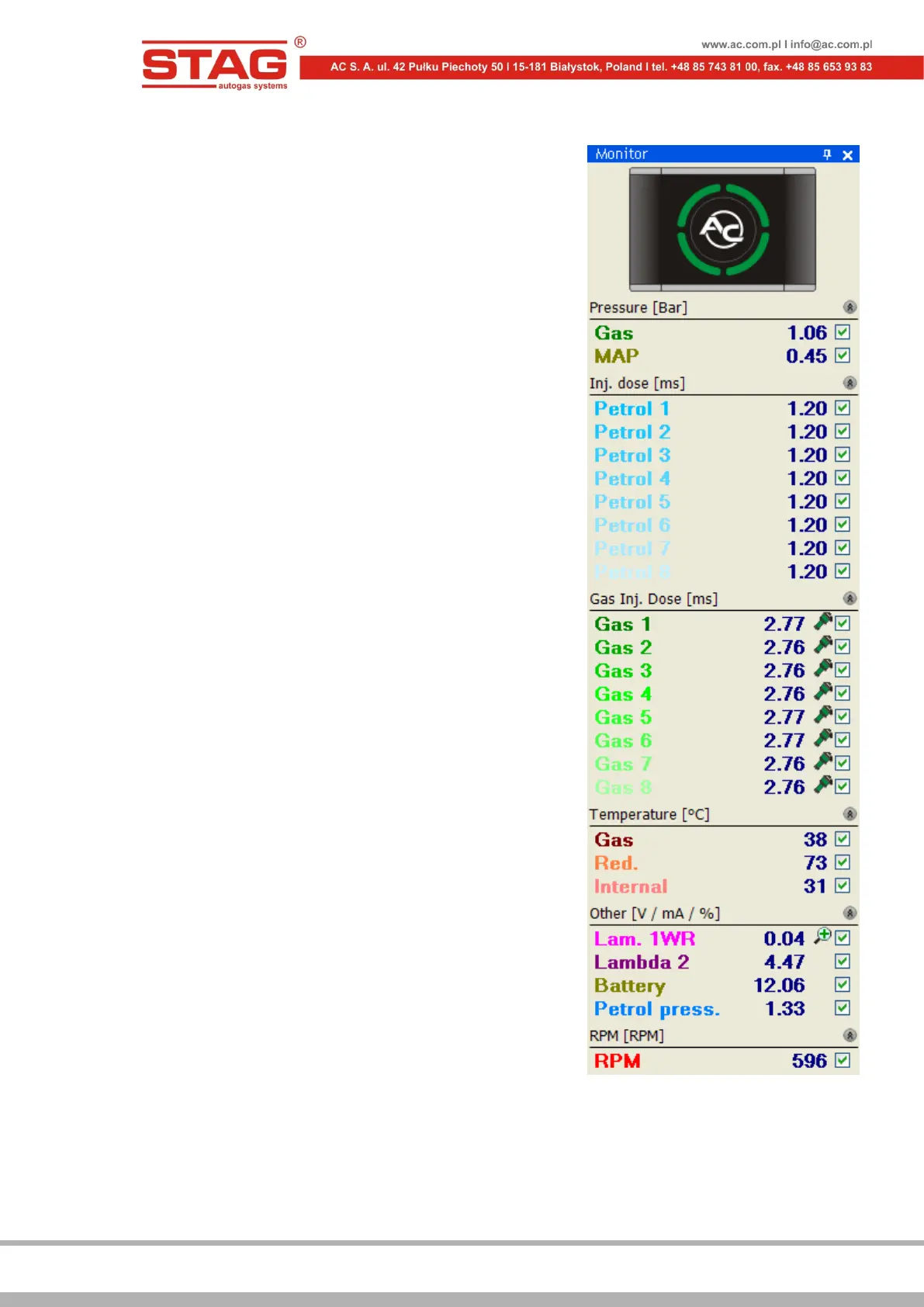
2.1.9 “Monitor” window
Monitor window displays current system's parameters:
• LED switchboard with the switch – click on
the switchboard to switch between LPG and
petrol
• Pressure [bar] – LPG pressure and pressure
in the MAP inlet manifold
• Inj. dose [ms] – calculated petrol injection
time for the petrol injectors
• Gas Inj. dose [ms] – injection time for the
LPG injectors
• Temperature [ºC] – temperature of the
injected gas, reducer temperature and
temperature inside the controller
• Voltage [V] – voltage values for lambda
probes as well as the car’s battery
• RPM [obr./min.] – engine rpm value
Figure 2.1.26 Monitor window
All the parameters displayed in the monitor window, are also visible on the oscilloscope. A
particular signal can be switched off in order for the oscilloscope not to record it. To do so,
uncheck a given signal in the window by the name. Click on the name field of a given parameter
displayed in the monitor window to enable its colour change.


 To Next Page