AC S.A. All rights reserved. Copying, publishing, distribution and any usage of the full or partial data included in the herewith document, particularly pictures, drawings, illustrations, trade marks etc. is
strictly prohibited under the law.
Page 48 of 54
Once the auto-calibration has been performed, the user can proceed with setting the vehicle in
road conditions using the multiplier map. Select Maps tab to do so and subsequently choose the
desired view option. We recommend the following controller’s map adjustment methods:
• Adjustment based on the injection times – keep injection times as well as the load on
the points visible on the multiplier map on a constant level while driving on petrol.
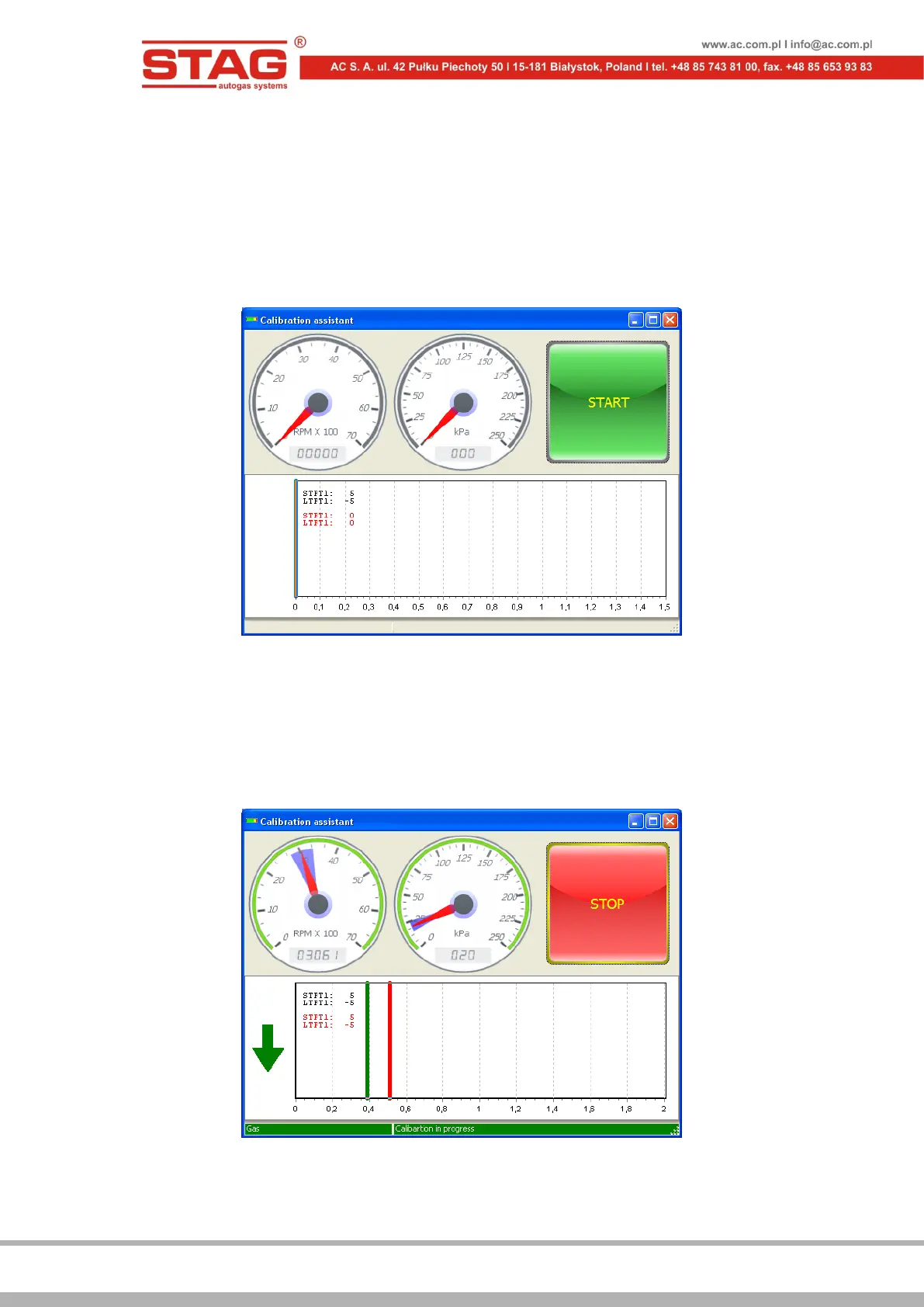
Calibration assistant will help you do this. The tool is represented by a window, which
displays a blown-up multiplier line to facilitate monitoring at the injection time.
Figure 2.2.4 “Calibration assistant” window
Calibration assistant can be accessed through the main menu, by selecting Window –
Calibration assistant. Click on Start button, while running on petrol in order to activate
the assistant.
Petrol injection time (the red line) as well as automatic switchover to LPG will be saved in
Calibration assistant window at stable driving conditions.
Figure 2.2.5 “Calibration assistant” window
Following the switchover, the green line indicates the current petrol injection time.
Correct the multiplier in such a manner as to make sure the green line corresponds with


 To Next Page