INSTRUCTION MANUAL FOR DISHWASHERS
Page 10 of 12
Chap 7 ADVANCED SETTINGS
The following adjustments should only be performed by a qualified technician.
OPERATING TEMPERATURE
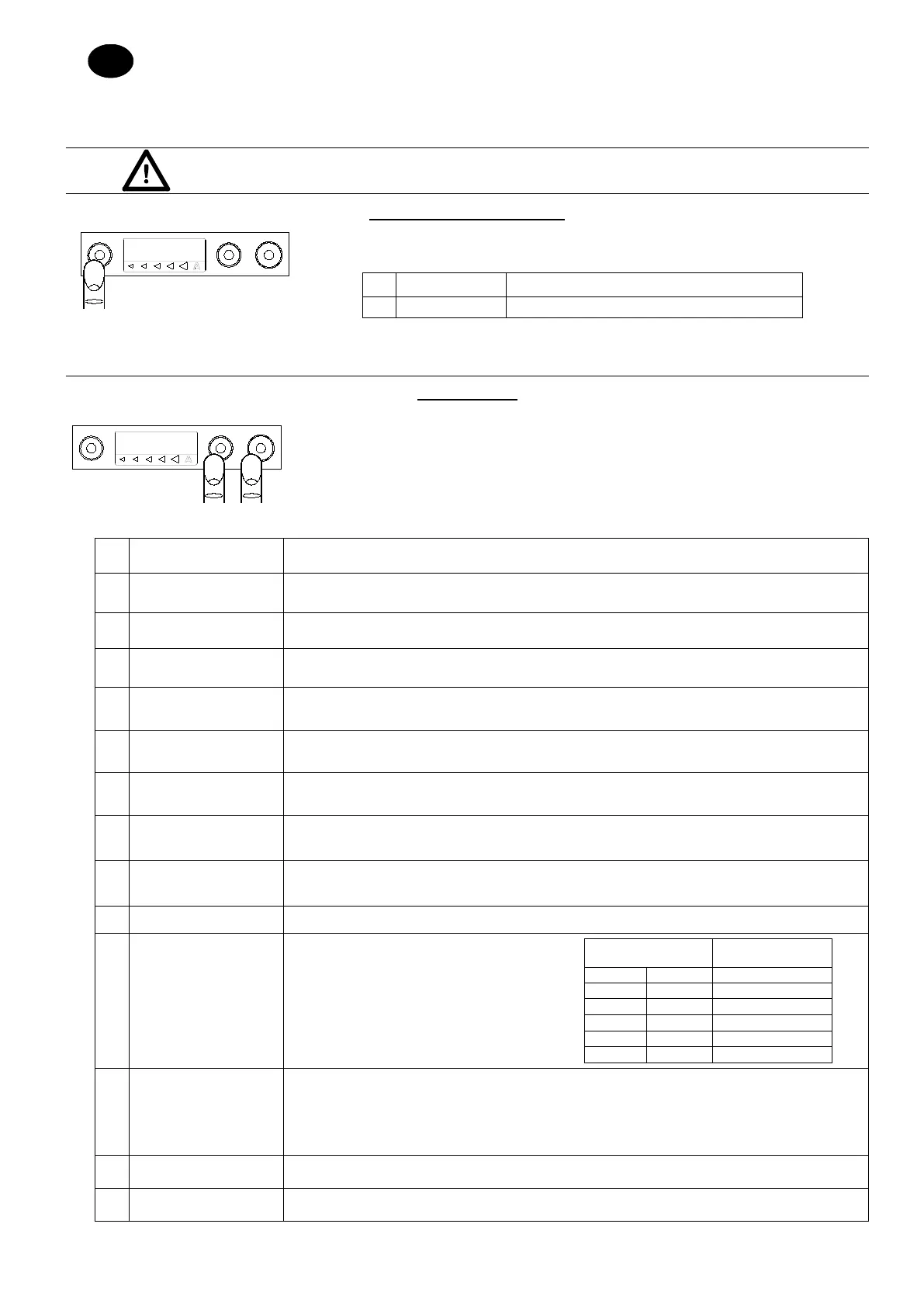
To access the temperature setting menu, press and hold the ON/OFF (1) button for a few seconds,
until the following menu appears:
A
BOILER SET
Rinse temperature adjustment
B
TANK SET
Tank temperature adjustment
To move from one command to the next, press the ON/OFF (1) button; to increase or decrease the parameters, press the CYCLE
SELECTION (2) and START (3) buttons. To exit the menu, press and hold the ON/OFF (1) button for a few seconds.
PARAMETERS
To access the settings menu, proceed as follows:
• While the machine is switched off, open the door
• Press and hold the CYCLE SELECTION (2) and START (3) buttons simultaneously for a few
seconds
• To move from one command to the next, press the ON/OFF (1) button; to increase or decrease
the parameters, press buttons 2 and 3. To exit the menu, press and hold the ON/OFF (1)
A
LANGUAGE
Changes the language in which user messages are displayed.
B
THERMO-STOP
Enables or disables the Thermostop function.
C
ENERGY SAVING
Enables or disables the Energy saving function.
D
PREHEATING
Enables or disables the Preheating function (fast machine heating).
E
DETERGENT PUMP
Enables the detergent pump continuously. Press and hold button 3 to enable the detergent pump so
that its circuit can be loaded.
F
RINSE AID PUMP
Enables the rinse aid pump continuously. Press and hold button 3 to enable the rinse pump so that its
circuit can be loaded.
G
RINSE PUMP
Manual operation of the rinse pump.
H
DOSAGE TIME
DURING WASHING
Detergent pump operating time. Buttons 2 and 3 can be used to increase or decrease the dosage time.
I
RINSE PRODUCT
DOSAGE TIME
Rinse aid pump operating time. Buttons 2 and 3 can be used to increase or decrease the dosage time.
J
DRAIN PUMP
Enable drain pump (*optional).
K
WATER HARDNESS
(Machines with built-in softener only) Set the
mains water hardness level in accordance with
the table below:
Water hardness
L
CYCLES FOR
REGENERATION
ALARM WITH
EXTERNAL
SOFTENER
If an external softener is installed, it is possible to enter the number of cycles run before the machine
displays a request for maintenance. When the number of cycles has elapsed, the machine will display
the message “SOFTENER MAINTENANCE”. To remove this alert, press and hold the START (3)
button while the door is open.
M
BUZZER
Enable buzzer.
N
CYCLE COUNTER
Indicates the number of cycles performed by the machine.



 To Next Page