the value assigned to Kt (watt hours or var hours). The duration of each output pulse is
approximately 25 milliseconds.
The default unit for the calibration pulses is watt hours. The meter may be switched to varh
calibration pulses using MeterMate software.
8.1.1.3 LCD Display
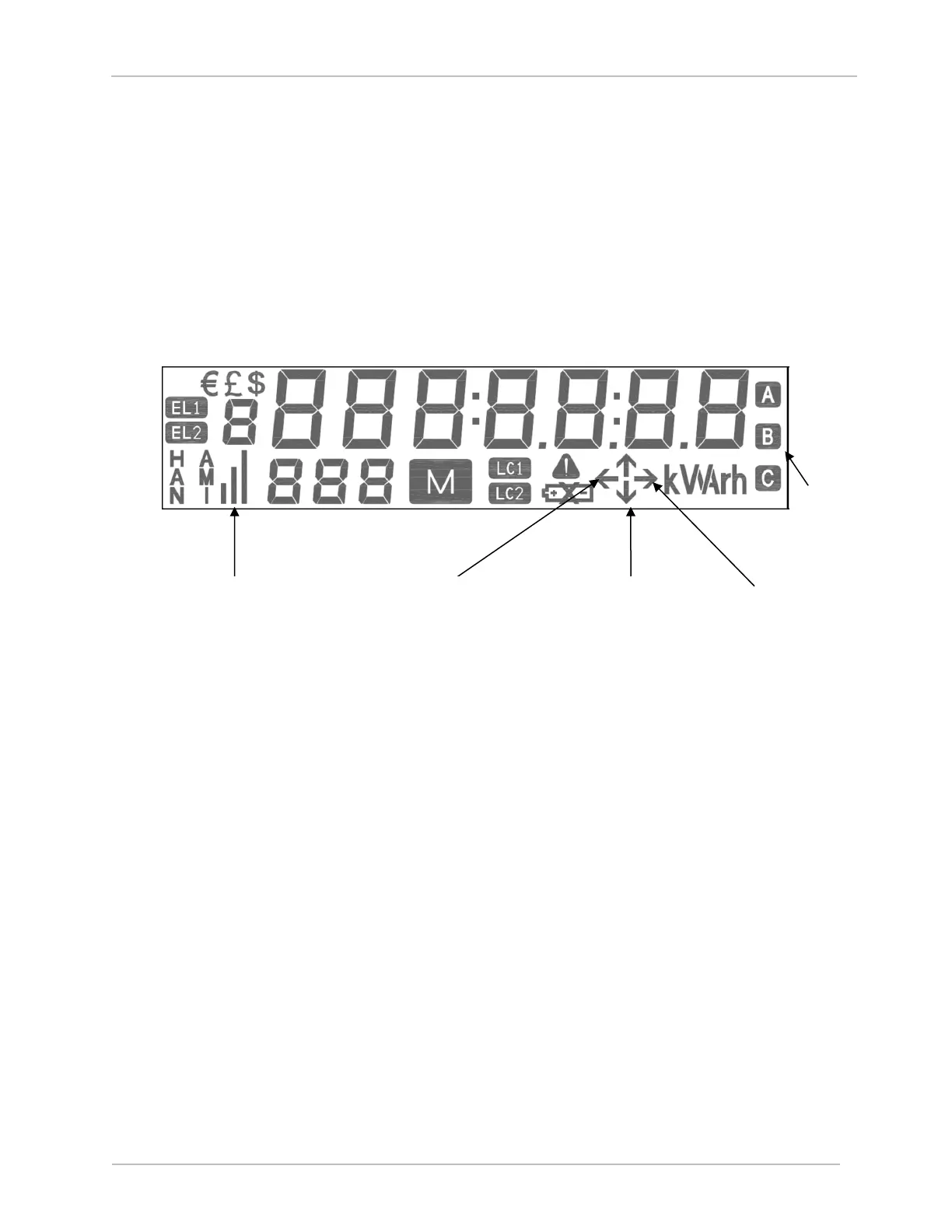
The SGM3000 Series meter is also equipped with a liquid crystal (LCD) display with test displays.
The LCD has annunciators for quadrant, phase voltage, and energy flow indication as shown in
the figure below. The annunciators provide valuable information during the testing process.
Figure 34 SGM3000 Liquid Crystal Display
For more information on these annunciators, refer to section 7.2.3 Liquid Crystal Display
Symbols.
8.2 Field Accuracy Test
Test mode allows the meter to be tested for accuracy in the field, without disturbing any billing
data.
In order to check the accuracy of the meter in the field a portable standard and a phantom load
generator is required.
1. The voltages of the source, reference meter, and the test meter should be connected in
parallel, and the current should be connected in series.
2. Set different parameters/ranges in the reference meter.
3. Apply voltage (230 V) to the reference meter and test the meter through phantom load and
give a warm up for 20 minutes.
4. Insert the meter constant in the reference meter (for example, 1000imp/kWh).
5. Apply current to the meter, such as 10 A, and UPF.
6. Set the sensor connected to the reference meter on the calibration LED/pulse LED of the
test meter.



 To Next Page