Need help?
Do you have a question about the Acroprint BioTouch and is the answer not in the manual?
Details FCC Part 15 compliance for Class A digital devices and potential interference.
Guidelines on lithium battery handling, warranty implications, and replacement.
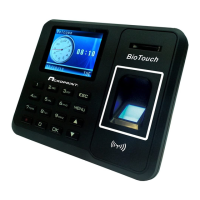
Lists all items included in the BioTouch Time Clock package and initial setup steps.
Configure shifts, start/end times, and punch parameters for accurate time tracking.
Steps to add new employees or update existing information via Excel and the clock.
Procedure for enrolling an employee's fingerprint on the time clock for identification.
Designating users as managers to protect clock data and control menu access.
Ways a manager can access the clock's menu using finger, card, or ID/password.
Details on how employees punch in using finger, badge, or ID and password.
How the clock confirms employee punches with name and ID display.
Steps to create punch reports and time cards, and view them in Excel.
Procedure to manually add a missed employee punch record directly on the clock.
How to download raw transaction data for import into other applications.
How to delete all transaction data or all enrolled employees from the clock.
Procedure to reset the clock to its original factory default settings.
Setting the cutoff time to properly credit employee work hours across midnight.
Steps to add or edit employee names directly on the clock interface using its keypad.
Recommended methods for cleaning the BioTouch time clock housing safely.
Guide for securely mounting the BioTouch clock to a wall using the included bracket.
 General
| Biometric Technology | Optical Fingerprint Sensor |
|---|---|
| Connectivity | USB |
| Verification Method | Fingerprint, PIN |
| Communication | TCP/IP, USB Host |
| Operating Temperature | 0°C to 45°C |
| Humidity | 20% to 80% |
| Weight | 0.38 kg |

 To Next Page