1
Before You Start!
What’s In the Box?
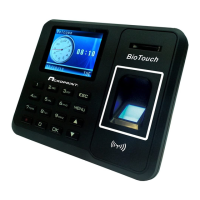
• Acroprint BioTouch Time Clock
• 5 Volts DC, 1A output Power Supply
• User Manual
• (1) Sample Proximity Badge
• Wall Mount Bracket w/screw
• Ziplok Bag: (3) Mounting Screws & (3) Plastic Wall Anchors
• (1) Table Stand Bracket
• (1) USB Flash Drive
1) Unpack time clock. Inspect for any damage that may have occurred during
shipment. Check box contents for any missing items.
2) If any damage is found or any parts are missing, please contact Acroprint
Customer Service at (800) 334-7190.
3) Connect the BioTouch power supply and plug it into a 120V/240V A/C power
source to turn the clock on.
Do not attempt to service the BioTouch Time Clock yourself.
Disassembling the clock will void the warranty. Always follow the
instructions in the User Guide.
• Do not place the clock in direct sunlight. Bright light may significantly affect
finger readings or cause finger verification to fail.
• The clock is designed for indoor use in a temperature range of 32-104º F (0-
40º C). The clock is not waterproof or shockproof. Keep the clock away from
heat sources such as radiators. Avoid dusty environments or exposure to
chemicals.
• The clock may be placed upright on a solid surface or mounted to a wall with
the included wall bracket & mounting screws. Avoid locations where the
device will be susceptible to vibrations and shock, such as a slamming door.
• The clock warranty does not cover defects or damages arising from improper
installation, improper storage, abuse, or unauthorized service.


 To Next Page