11
Editing Data at the clock
In general, we recommend editing most data at the PC. The resources on a PC
and in the Excel program provide a robust, familiar environment for adding and
editing information. This is the approach used throughout this manual.
However, there are times when you may wish to perform these task at the clock.
The example we’ll review is entering an employee name:
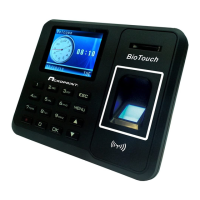
1. Select ‘Menu’, User Mgt, Add User, User Name
2. Press the key containing the first letter of the employee name and then
press ‘OK’.
3. Press the number that is over the letter you wish to enter.
4. Press the key containing the next letter of the employee’s name and
then press ‘OK’
5. Again, press the number that is over the letter you wish to enter.
6. Repeat steps 4 and 5 above until complete
7. Press ‘ESC’ to get back to the Add User Menu.
8. Press ‘ESC’ to exit the Add User Menu
9. Press ‘OK’ to save the data.
10. Press ‘ESC’ repeatedly to exit or simply allow the menus to time out.


 To Next Page