AR-B1579 User’s Guide
3-8
3.2.8 Serial Port
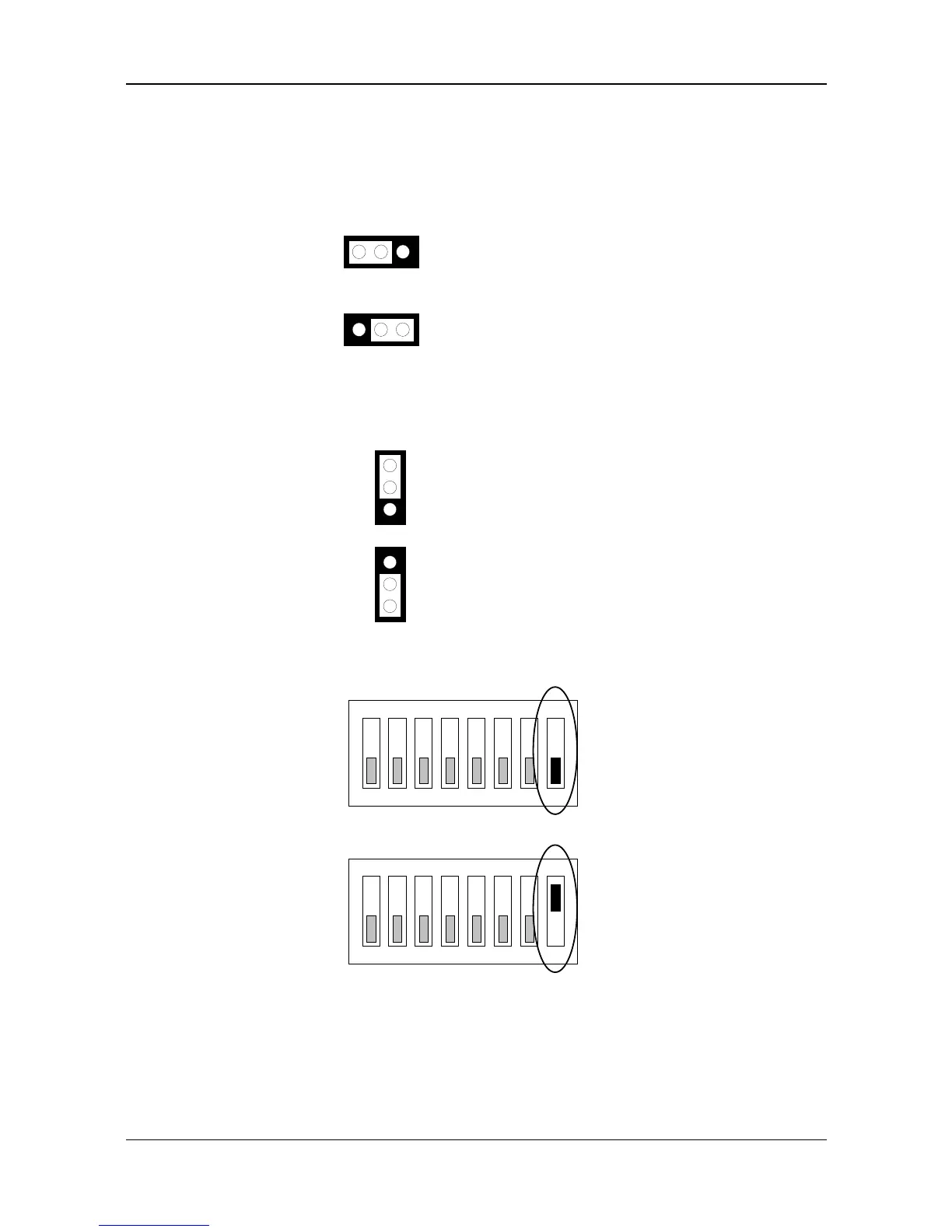
(1) RS-232/RS-485 Select (JP1, JP4 & SW1-8)
JP1 selects COM B port, and adjusts the CN3 connector is RS-485 or RS-232C. JP4 selects COM A port for using
DB2 for RS-232C or connects External RS-485. SW1-8 adjusts the onboard RS-485.
(A) COM-A RS-485 Adapter Select (JP4)
R
lt
Figure 3-12 JP4: COM-A RS-485 Adapter Select
(B) COM-B RS-485 Adapter Select (JP2)
Reserved for Acrosser's
RS-485 Adapter Used Only
1
2
3
RS-232C
1
2
3
Factory-Default Setting
Figure 3-13 JP2: COM-B RS-485 Adapter Select
(C) COM-B RS-232C/RS-485 Select (SW1-8)
ON
123456
OFF
SW1-8 -- RS-232 (Factory Default Setting)
7 8
ON
123456
OFF
SW1-8 -- RS-485
7 8
Figure 3-14 SW1-8: COM-B RS-232C/RS-485 Select



 To Next Page