Hardware Manual
23
Step 6: Adjust the Viewing Angle and Focus
Based on the camera live view, adjust the viewing angle, orientation and focus of the camera.
See How to Adjust the Viewing Angle and Flocus on page 26 for more information.
Step 7: Close the Dome Cover
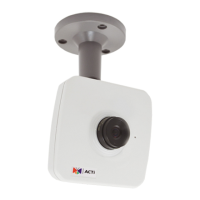
1. Align the screws with the screw holes of the camera. Note that if the cables are routed
along the ceiling or wall, route the cable to pass through the cable hole on the dome cover.
2. Tighten the three (3) screws to attach the dome cover to the camera body.
3. Remove the plastic covering the dome cover.



 To Next Page