9
I?
l.?=OOAM
..
SET
r1 nrL,7
LLULf\
. .
12=38 PM
6 SET A
12:38 PM
..
SET
]RTE?
. .
T ~T A
12 /0 I
6 SET A
Set the Time & Date
The clock and calendar are utilized to time stamp history records and other
data, so it is important to set the time and date soon after you power on the
display unit.
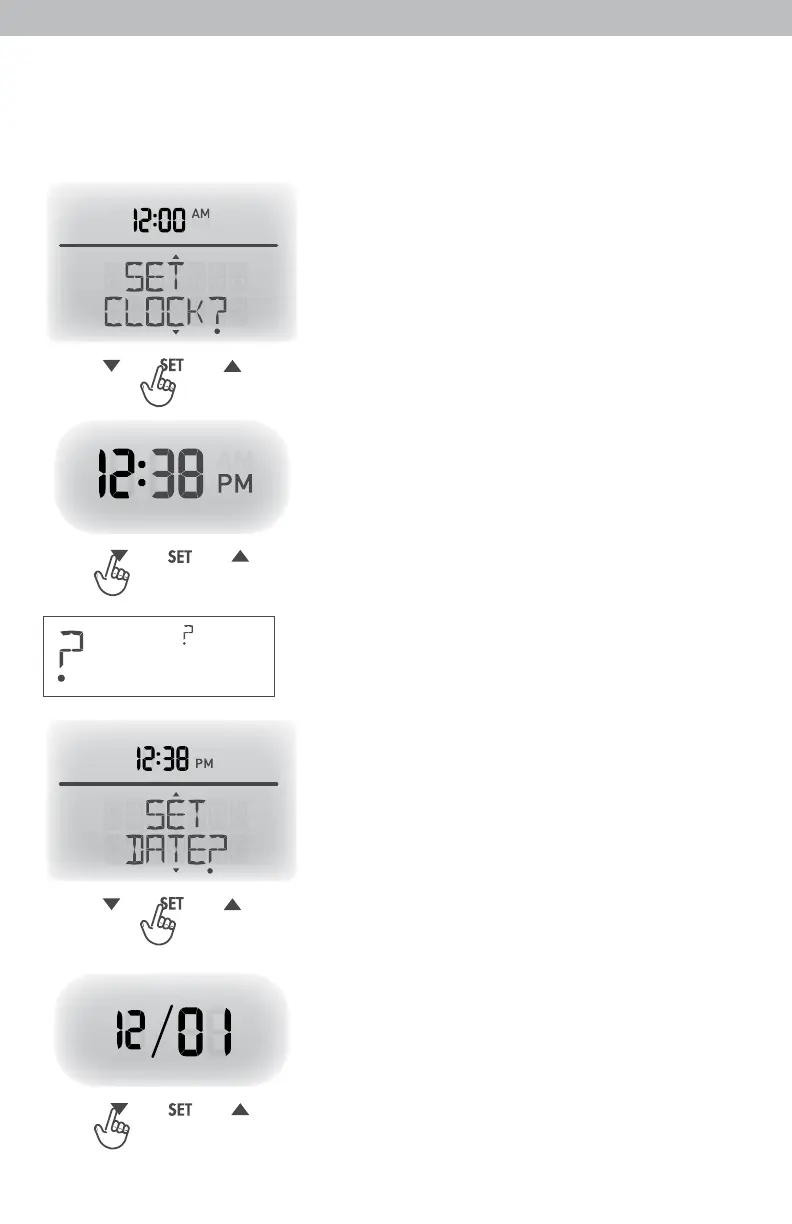
Set the Time
1. Press the “
▲
” or “
▼
” buttons until
“SET CLOCK?” is displayed on the
Selectable Category part of the display unit.
2. Press the “SET” button to set the clock.
3. Press the “
▲
” or “
▼
” to adjust the hour.
Note the “AM” and “PM” indicators.
4. Press the “SET” button to conrm hour
selection.
5. Press the “
▲
” or “
▼
” to adjust minutes.
6. Press the “SET” button to conrm minute
selection.
The clock is now set.
Set the Date
Note: The “ ” stays in
1. Press the “
▲
” or “
▼
” buttons until
Selectable Categories,
“SET DATE?” is displayed on the
even after setup.
Selectable Category part of the display unit.
2. Press the “SET” button to set the date.
3. Press the “
▲
” or “
▼
” to adjust the month.
4. Press the “SET” button to conrm month
selection.
5. Press the “
▲
” or “
▼
” to adjust the day.
6. Press the “SET” button to conrm day
selection.
7. Press the “
▲
” or “
▼
” to adjust the year.
8. Press the “SET” button to conrm year
selection.
The date is now set.



 To Next Page