14
OPERATION
Using the Professional Weather Center
Learning Mode
Self-Calibrating Forecasting use a unique algorithm to analyze changes in
pressure over a time period (called Learning Mode) to determine your altitude.
After 14 days, the Learning Mode icon disappears from the display screen. At
this point, the self-calibrated pressure is tuned in to your location and the unit is
ready for superior weather prediction.
Weather Forecast
AcuRite’s patented Self-Calibrating Forecasting provides your personal forecast
of weather conditions for the next 12 to 24 hours by collecting data from
the sensor in your backyard. It generates a forecast with pinpoint accuracy -
personalized for your exact location.
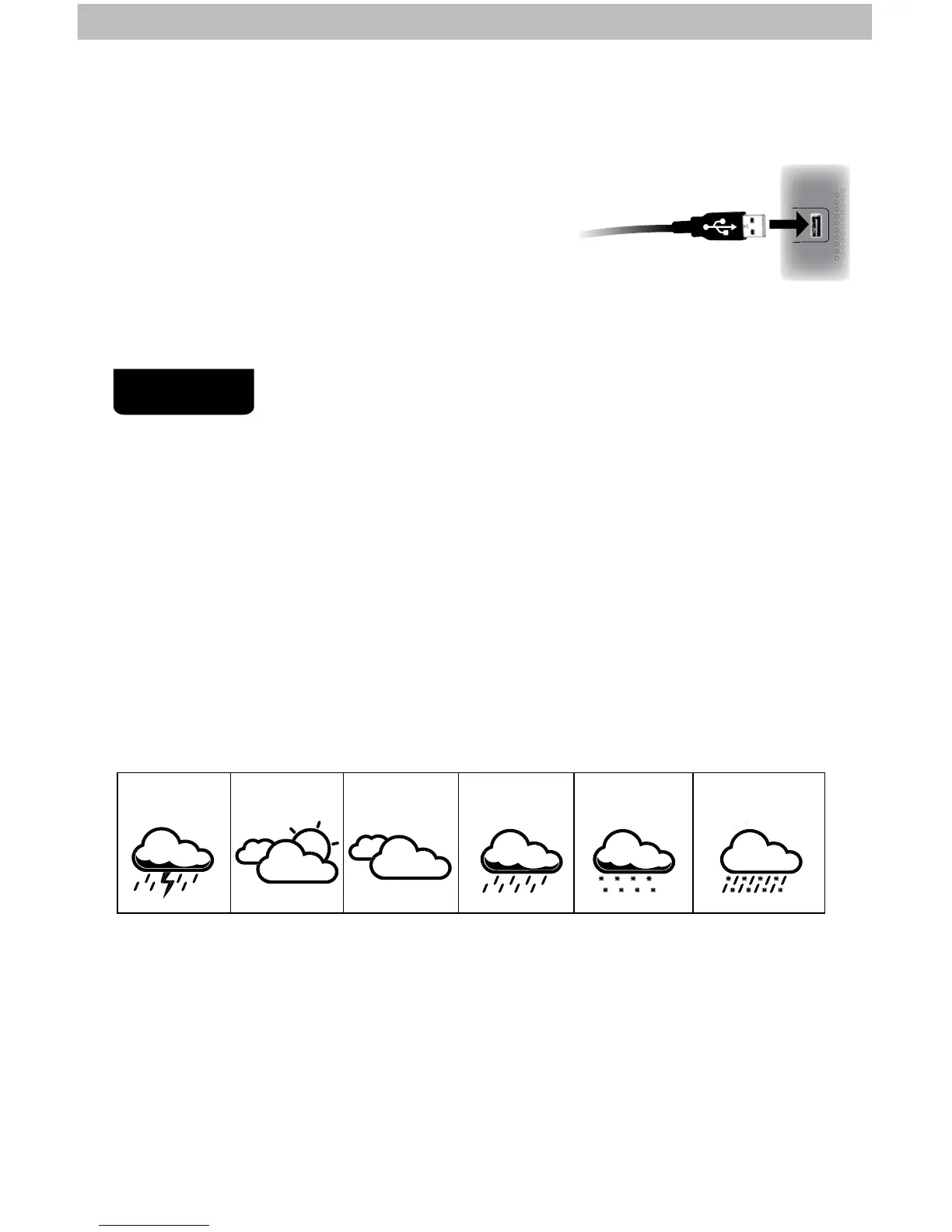
View the complete list of icons at www.AcuRite.com/acurite-icons
RAIN
LIKELY
SNOW
LIKELY
CHANCE OF MIXED
RAIN & SNOWCLOUDY
PARTLY
CLOUDY
STORM
LIKELY
After AcuRite Connect is installed on the computer, the initial conguration will
begin automatically. When selecting where to save weather data downloaded
from the display, a folder named “AcuRite Weather Station” will be created
on the computer.
When prompted by the software to plug in the display,
connect the USB (larger end of the cable) into
a USB port on the computer.
AcuRite Connect is installed and ready for use.
Follow the instructions within the AcuRite Connect app to complete setup and
begin using the software.
3
4



 To Next Page