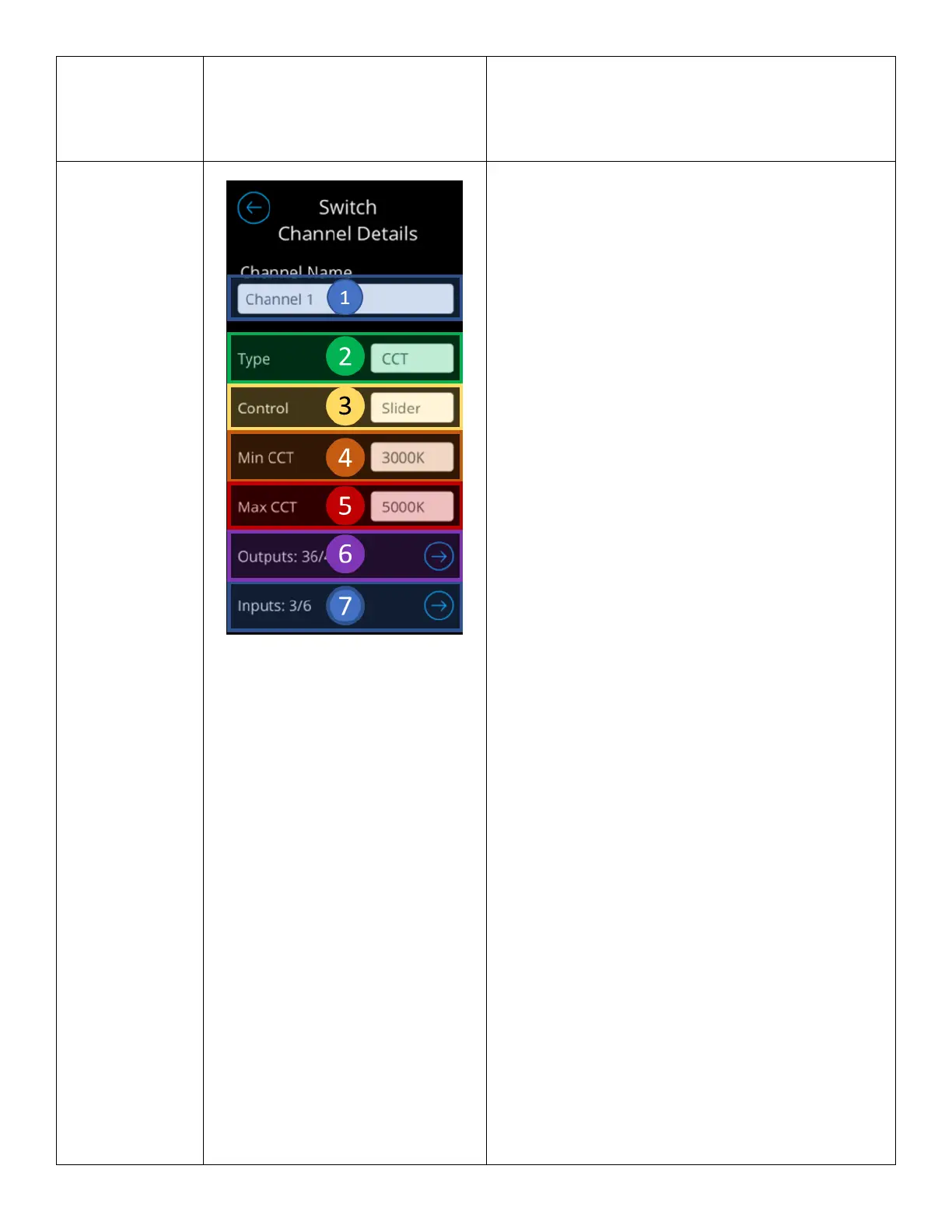
From the Channel Detail screen, users can configure an
individual channel to the extent below:
1. Name Field - Used to modify the name of the
channel.
o Changes to this channel shall be
reflected on SensorView.
2. Channel Type – Designates a channel to of of a
specific type.
o Options include:
▪ Light – When channel of this
type is enabled, it appears in
the Lights Dashboard.
▪ Shade – When channel of this
type is enabled, it appears in
the Shades Dashboard.
▪ CCT – When channel of this
type is enabled, it appears in
the Lights Dashboard.
Administrators are also
required to enter minimum
and maximum Kelvin
temperature
▪ None – Channels of this type
do not appear in any
Dashboards.
3. Channel Control Type – Designates a channel’s
control type. This property determines the
interfacing elements operators will be using to
control the channel’s level
o Options include:
▪ Slider – Channels of this type
will display control element as
a slider
▪ Raise/Lower – Channels of this
type will display control
elements as a slider in the
Light/Shades Dashboard. In the
channel control screens, the
control elements will be
represented as raise/lower
buttons.
▪ On/Off – Channels of this type
will display control elements as
an On/Off button.
4. Minimum CCT – Available only for CCT
channels, this field enable the minimum kelvin
temperature this channel should hold.
5. Maximum CCT – Available only for CCT



 To Next Page