9
-8-
·.r
-8-
·-.r
Set the Time, Date & Units
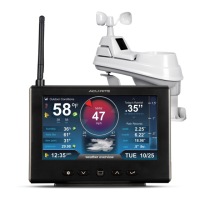
Press the “SET” button, located on the front of the display, to enter SET MODE.
Once in set mode, the preference you are currently setting will blink on the
display.
To adjust the currently selected (ashing) item, press and release the “
T
“ or
“
V
“ buttons (press and HOLD to fast adjust).
To save your adjustments, press and release the “SET” button again to adjust
the next preference. The preference set order is as follows:
CLOCK HOUR
CLOCK MINUTE
CALENDAR MONTH
CALENDAR DATE
CALENDAR YEAR
TEMPERATURE UNITS (ºF or ºC)
WIND UNITS (MPH, KPH, or Knots)
RAIN UNITS (inches or mm)
PRESSURE UNITS (inHg or hPa)
You will automatically exit SET MODE if no buttons are pressed for 20 seconds.
Enter setup mode at any time by pressing the “SET” button.
Display Backlight Settings
This weather station’s display features three different lighting settings: High
(100%) brightness, Medium (60%) brightness and Low (30%) brightness.
Using battery power alone, the backlight is available momentarily for 10
seconds by pressing the “ ” button.
When display is powered with the power adapter, backlight remains on at
100% brightness. Press “ ” button once to dim to 60% brightness; press
again to dim to 30%, press a 3rd time to enter “AUTO DIM” mode. “AUTO
DIM” appears below time.
AUTO DIM MODE: Automatically adjusts display brightness based on time of day & year.
MARCH 11- NOVEMBER 4 6:00 a.m. - 9:00 p.m. = 100% brightness
9:01 p.m. - 5:59 a.m.= 30% brightness
NOVEMBER 5 - MARCH 10 7:30 a.m. - 7:00 p.m.= 100% brightness
7:01 p.m. - 7:29 a.m. = 30% brightness



 To Next Page