The Code
This example includes multiple visual effects. Copy and paste the code into code.py using your favorite editor, and
save the file.
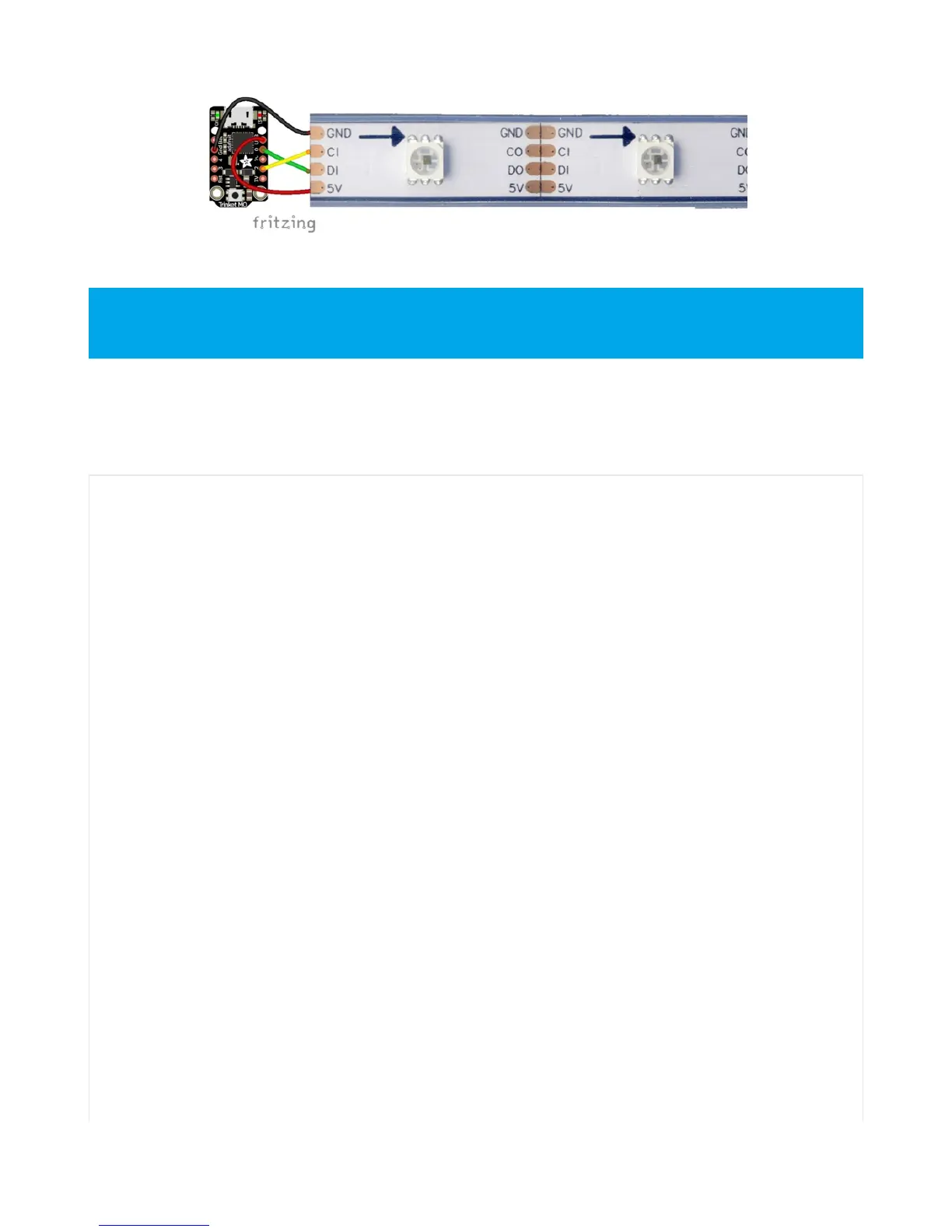
Note that the wire ordering on your DotStar strip or shape may not exactly match the diagram above. Check
the markings to verify which pin is DIN, CIN, 5V and GND
# CircuitPython demo - Dotstar
import time
import adafruit_dotstar
import board
num_pixels = 30
pixels = adafruit_dotstar.DotStar(board.A1, board.A2, num_pixels, brightness=0.1, auto_write=False)
def wheel(pos):
# Input a value 0 to 255 to get a color value.
# The colours are a transition r - g - b - back to r.
if pos < 0 or pos > 255:
return (0, 0, 0)
if pos < 85:
return (255 - pos * 3, pos * 3, 0)
if pos < 170:
pos -= 85
return (0, 255 - pos * 3, pos * 3)
pos -= 170
return (pos * 3, 0, 255 - pos * 3)
def color_fill(color, wait):
pixels.fill(color)
pixels.show()
time.sleep(wait)
def slice_alternating(wait):
pixels[::2] = [RED] * (num_pixels // 2)
pixels.show()
time.sleep(wait)
pixels[1::2] = [ORANGE] * (num_pixels // 2)
pixels.show()
time.sleep(wait)


 To Next Page
 Loading...

