7
1
2
3
4
5
67
8
9
LIGHT
TIMER
CLEAN
ON/OFF
A. Water dividing pipe:With eight little holes, water will flow out from these little holes. And if no
water flows out, can be disassembled and cleaned.
B. Evaporator (ice-making module)
C. Ice full detecting board: Use to detect the inner cabinet is full of ice or no t, and to check the
ice-harvest process is over or not.
D. Water tank f or water circulation: Approximate 0.9 litters volum e
E. Water supplying pipe
F. Cover board on the right side of the evaporator
G. Water level sw
itch installing plate
H. Water drain pipe of the water tank:When ice-making, thi s pipe should be clamped in the s lot of
the water tank wall; And when draining, this pipe should be pulled out.
I. Ice full detec tor
J. Water circulat ion pump
K. Water level detecting switch
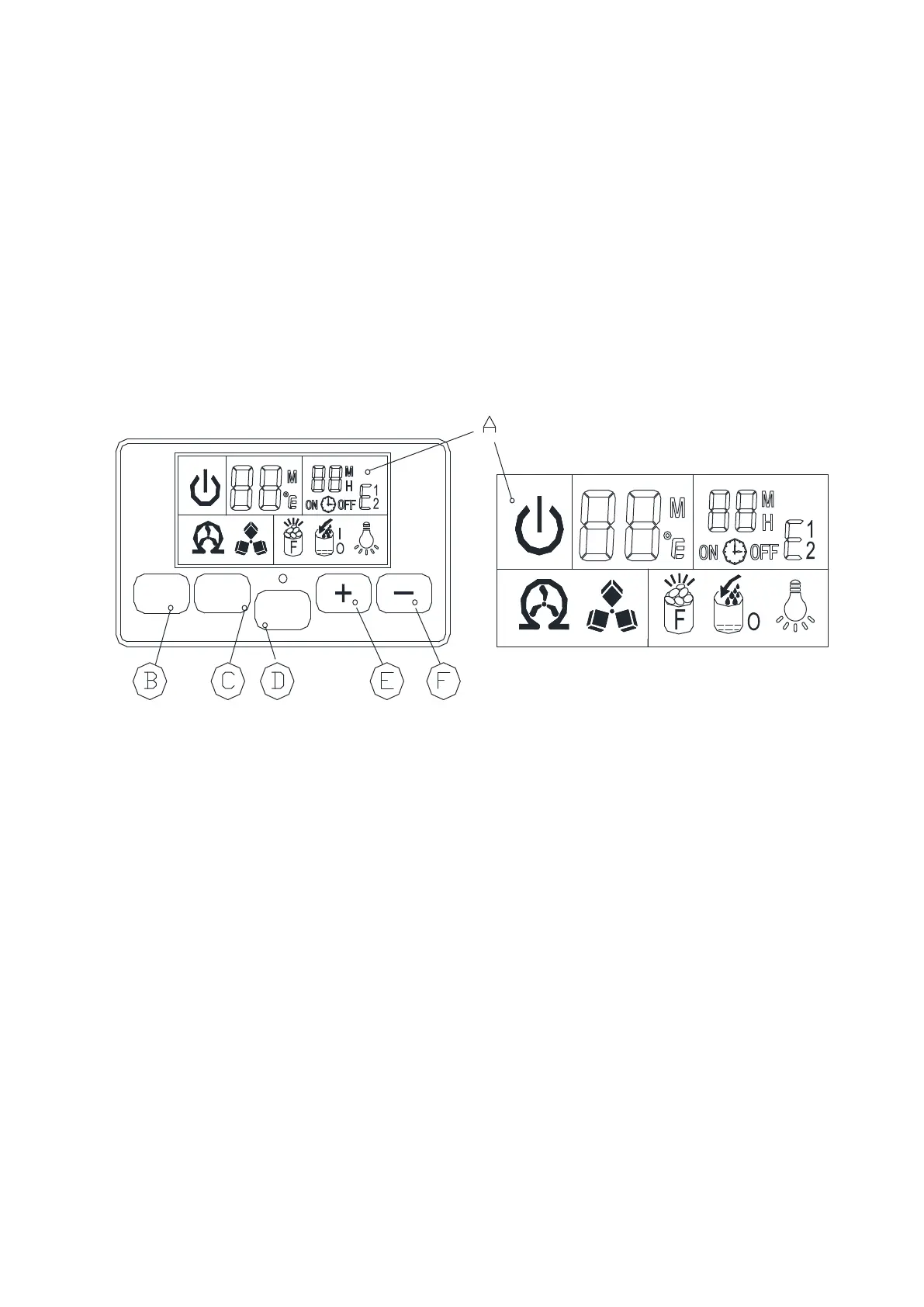
3) Operation panel
A.LCD display window
1、Unit ON or OFF state symbol: When the unit is turned off(standby mode), thi s symbol
flashes, and when the unit is working, the symbol will keep lighting on.
2、Ambient te
mperature and ice-making countdown time display
3、Ice-makin g setting and Timer setting dis play
4、Error code:E1 means that the ambient temperature sensor is f aulted
E2 means that ice-making process is abnormal;
5、Light symbol:When this symbol displays, the LED light inside the cabinet will be on;
6、Water flowing and wat er absence symbol: If the arrow of this symbol flashes, means the
water is flow in from main water supply; And if the whole symbol keeps on, mea ns there is
no
water from main water supply.
7、Ice-full display: When the ice storing cabinet is full of the ice cube, this symbol will display,
and the unit will stop ice-m aking process.
8、Ice making and harvest display:When the ice cube symbol keep rotation, means the unit
is making the ice; And if the symbol flashes, means the unit is during the ice harvest process.
9、Self-cleaning display.
B.“LED light” button : To turn on or turn off the internal LED light;
Note: Keep pressing this bu
tton for more than 5 seconds, it is to change the ambient
temperature unit between Fahrenheit degree and Centigr ade degree.
C .“Timer/Clean”button:Quickly press this button once, to enter the Timer s etting program; And
press this button for more than 5 secon ds, to let the unit enter the Self-Cleaning
program.



 To Next Page