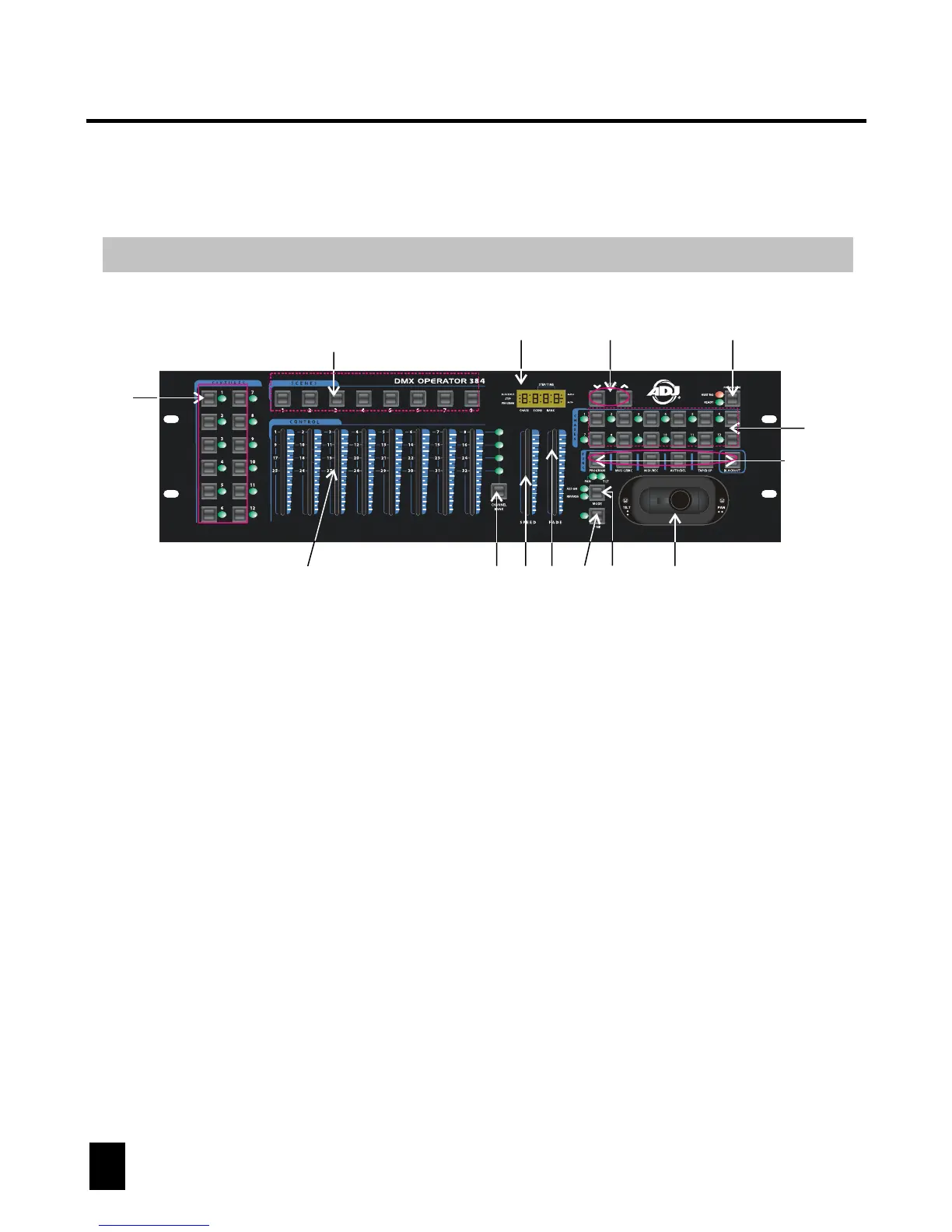
8. Joystick/Jog wheel:
Traditionally used to adjust the X/Y channels of a moving light.
6. FINE button:
Used in conjunction with the joystick or data wheels. When the FINE button is
engaged, adjusting the joystick or data wheels will be more precise when needing
to hit a specific area with a scanner or moving head.
7. MODE button:
This is a multi-function button that is used when assigning the joystick & Fade
setting.
Control and Functions
Front Panel Overview
4. Speed fader:
Used to adjust chase speed (range is 0.1 second to 10 minutes per step).
1. Fixture buttons(1~12):
Used to select relevant fixtures for control.
5. Fade Time fader:
Used to adjust chase fade time (range is 0 to 30 seconds).
3. Channel Bank button:
Used to switch between channels 1-8, 9-16, 17~24 and 25~32.
2. Channel faders(1~8):
Used to control the output of each corresponding fixture channel.
4
DMX OPERATOR 384
1
2
3
4
56
9
10 11
13
7
8
12
14~19



 To Next Page