EasyManua.ls Logo

Adleepower AP4G3 - DIGITAL OPERATION PANEL

Default Icon
103 pages
Print Icon
To Next Page IconTo Next Page
To Previous Page IconTo Previous Page
Loading...
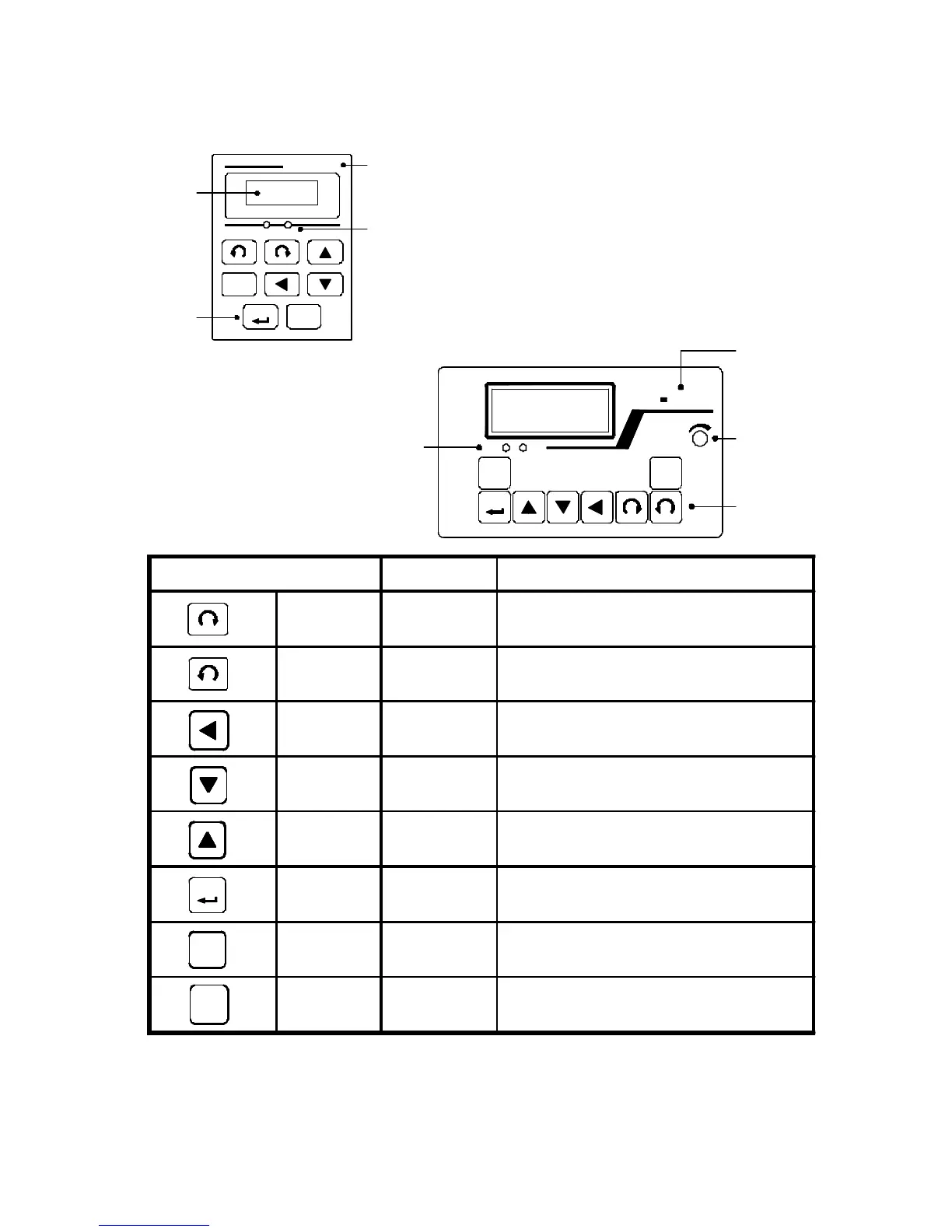
6. DIGITAL OPERATION PANEL
17
FUNC
STOP
LED Operating
FUNC
FWD REV
Key
Model
VR
FREQ. SET
STOP
DSPAP G3
SMART INVERTER
Indication
Indication
ENTER
FWD REV
AP-G3 DSP
SMART INVERTER
STOP
Model
LED Operating
Digital
Key
Indication
Indication
Indication
ENTER
FUNC
Operation key Key function Description
FWD RUN Forward run Commands forward run
REV RUN Reverse run Commands reverse run
SHIFT
Cursor
movement
Select the digit
DOWN Down Decrease the parameter value
UP Up Increase the parameter value
ENTER
Memory
storage
Saves the setting vaule
FUNC Function
Press once to select function CDxx and
press again to change its content
STOP Stop Stop operation / Escape to standby mode
ENTER

Related product manuals