ADPRO iFT Gateway Hardware Installation Manual
33104_01 19
8 Network I/O Units (Net I/O)
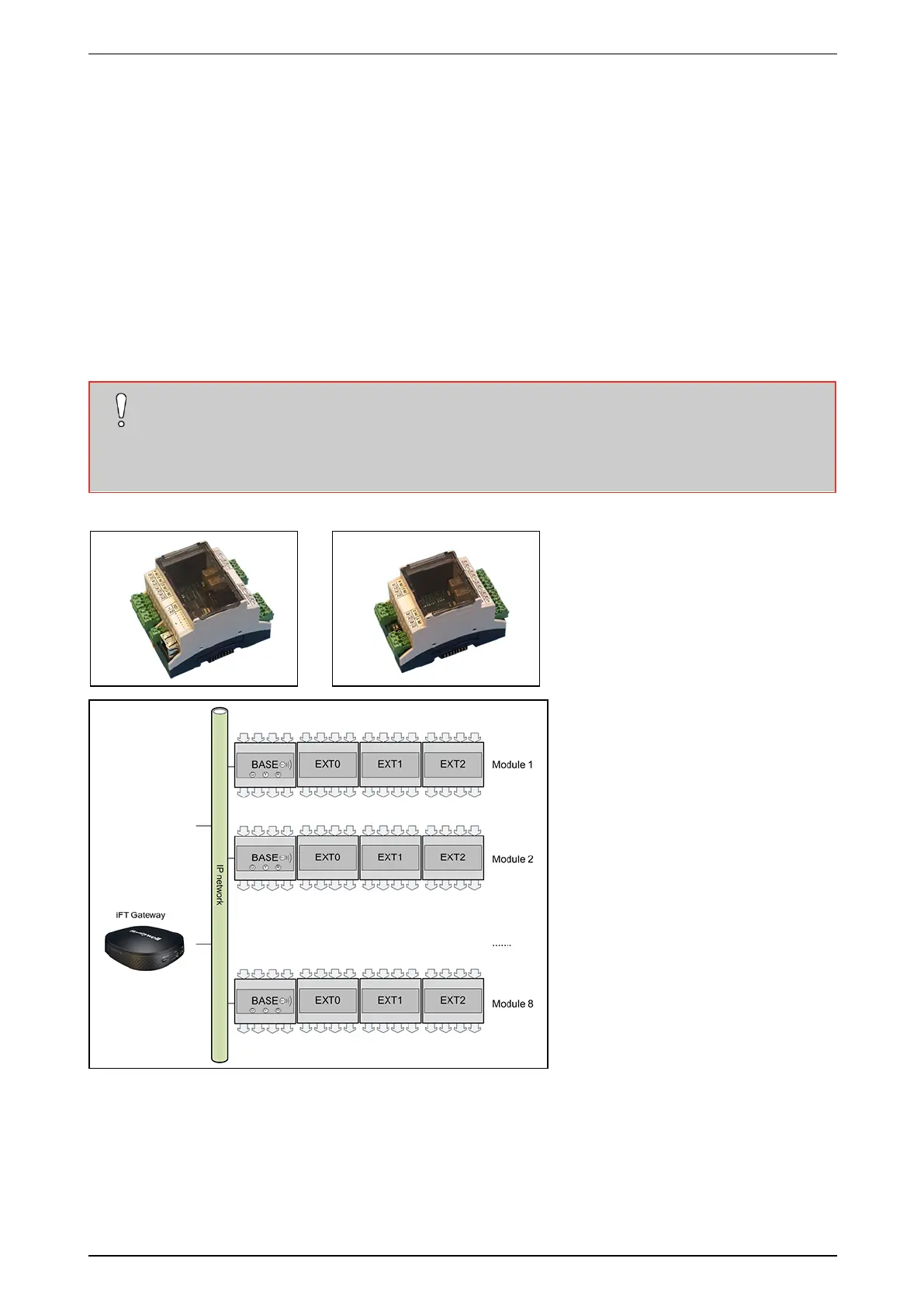
TheNetwork(Net)I/OunitsprovideextrainputsandoutputsforyourXOdevice.YoumounttheunitsonaDIN
railandconnectthemtothelocalnetwork.Topowertheunits:usePoE,aPoEinjector,oralocalpoweradapter
(12VDC;min.350mA).
Eachbaseunitoffers4inputsand4outputs,andLEDindicatorsandabuzzercontrolledbytheXOdevice.You
canextendeachbaseunitwith1to3extensionunits,toobtainupto16inputsandoutputs.
AsyoucanlinkyourXOdevicetoupto8units(8baseunits,eachwithupto3extensionunits),youcanobtaina
totalof128extrainputsand128extraoutputs.
ThelatestNetI/Ounitsoffermonitoredinputs(requiresV2hardwareandfirmware,andmin.firmwareversion
XO4.02runningonthecontrollingXOdevice.Fordetailsonmonitoredinputs,seetheADPRO Network I/O
Units Technical Manual(33355).
Caution!
Before plugging or unplugging any extension units, switch off the power to the base unit.
Pluggingorunpluggingextensionunitswithpoweronmayresultinpermanent and irreparable
damage tothebaseand/orextensionunits.
Baseunit: Extensionunit:
Fordetailedinstallationinstructions,includingprogrammingtheIPaddressandupdatingthesoftware,seethe
ADPRO Network I/O Units Technical Manual(33355).
Toconfiguretheinputsandoutputs,seetheXO Client Software User Manual for iFT Gateway(33103).



 To Next Page