ADT 7100 User Manual Operating Procedure
Putting blade on the tool
New blades for standard processes can be purchased from the LNF online store. Warning!
Never touch the edge of a blade; this can cut you and damage the blade. Look at the ADT LNF
wiki page for accessing a video showing this process.
Blades are replaced on the dicing saw for a variety of reasons, including:
a. Worn Blades (not enough clearance or exposure)
b. Blade type or size is not the same as the recipe
c. Bad kerf (which may indicate a problem with a Blade)
d. Broken Blades. Do not use a broken blade as this will likely cause the chuck to
be damaged, and cut quality may be inadequate and may lead to loss of tool
access.
1. The system should be already initialized and the right recipe loaded.
2. Initiate the Blade Change procedure in one of the following ways
a. Right-click the green Blade Indicator and select Blade Change, or
b. Manual menu → Services → Blade Change, or
c. In the Blade Change tab of the Blade Information screen, click Change.
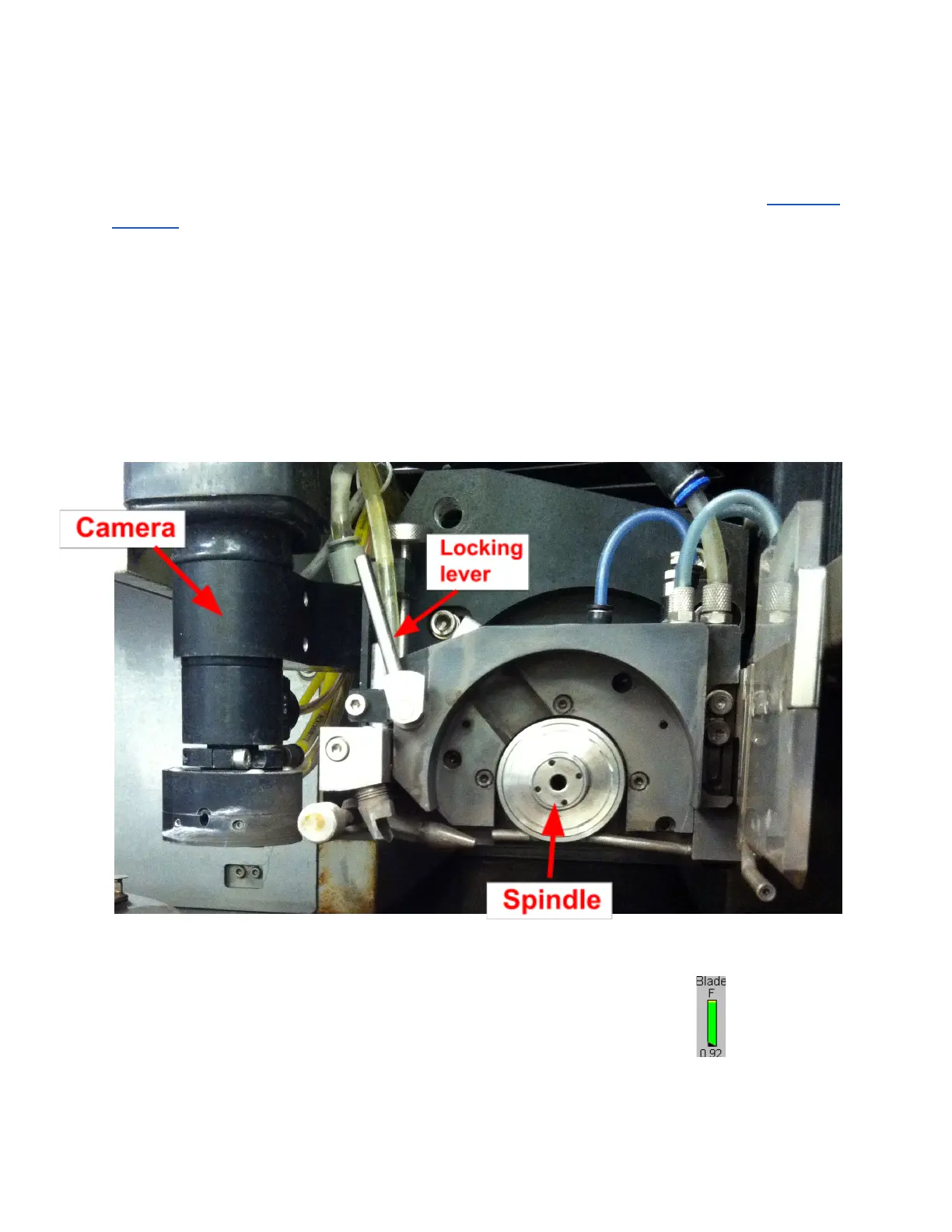
3. The Spindle stops rotating and moves automatically to the Blade Change station to
enable easy access to the Blade. The GUI displays the Define Blade screen.
Lurie Nanofabrication Facility 2-10


 To Next Page