11
Charging the Keyboard
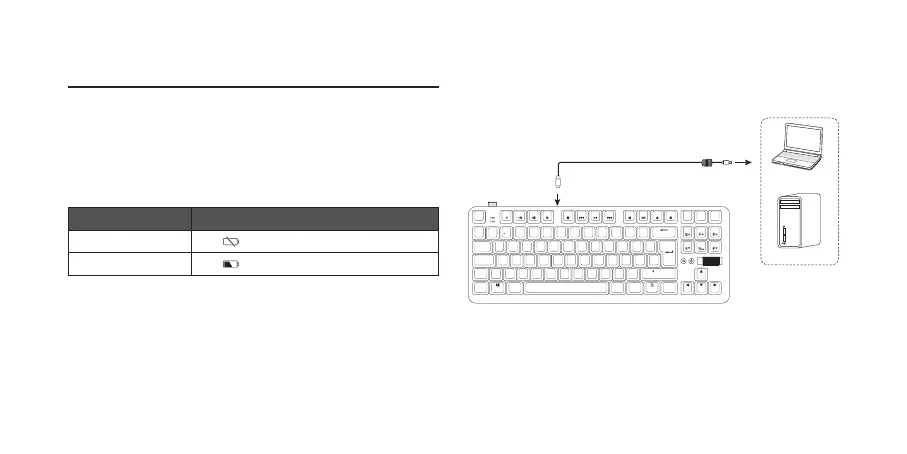
Fully charge the unit before rst use.
1. Plug the USB A to Type C cable (included) into the USB
Type-C socket of the unit.
2. Connect the other end of the cable into the USB 3.0
port of your laptop or computer (not included).
Status LED Indicator
Low battery The
indicator will flash.
Charging The
indicator will light up red.
Insert PgUpHome
Delete PgDnEnd
Caps
Tab
Shift
Shift
Ctrl
Ctrl
Alt
Alt Gr Fn
Q W R T Y U I O PE
Z C V B N M
< >
?
, .
/
X
A S F G H J K LD
F1
Esc
F2 F3 F4 F5 F6 F7 F8 F9 F10 F11 F12
:
´
;
@
{
[ ]
}
Screen
Print
Break
Pause
Lock
Scroll
˜
#
1 2
£
3
!
¬
`
¦
6
$
4
€
5
^
%
7 8 9 0
–
-
+
=
&
*
( )
\
|
USB A to Type C Cable (included)
Laptop
Computer



 To Next Page