English
35
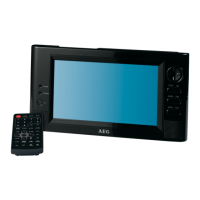
Location of Controls (Fig.1)
1 ANT. antenna jack
2 SD/MC/MMS card reader slot
3 USB port
4 TFT display
5 p Navigation button / switching pre-set programs
in DVB-T mode.
q Navigation button / switching pre-set programs
in DVB-T mode.
u Navigation button
t Navigation button
6 Source button (TV/AV)
7 Conrmation button (OK)
8 MODE button
9 EPG button
10 Exit button (EXIT)
11 MENU button
12 Speakers
13 IR sensor for remote control
14 Battery charging indicator (CHARG)
15 Power indicator
16 DC IN 9-12V jack
17 Power button (ON POWER OFF)
18 Stand
19 AV OUT jack
20 headphones jack
21 AV IN jack
22 VOLUME control
Remote Control (Fig. 2)
1 MUTE: Mute the sound.
2 10+:
Select chapters/tracks greater than 9. Press again to
increase by 10.
3 SCAN:
In DVB-T mode activate scan.
4 SUBTITLE: Show/hide subtitles.
– In EPG mode access extended info mode.
– Moves a channel in “Channel Organizer” menu.
5 AUDIO: Change audio settings.
– In EPG mode access timer.
– Locks channels in “Channel Organizer” menu.
6 n: Stop playback.
7 uII: Start playback. Freeze image. Press uII to
continue.
8 MODE: Set image parameters LCD display.
9 TTX: Teletext on/o.
10 EPG:
In DVB-T mode access EPG function.
11 : Skip to previous chapter or song.
12 : Skip to next chapter or song.
13 : Fast forward. Zoom in when zoom function
activated.
14 : Rewind. Zoom out when zoom function acti-
vated.
15 DISPLAY: In DVB-T mode display current channel
number. Press again to display signal strength and
signal quality. Press again to hide information.
16 EXIT:
Exit menu. In DVB-T mode return to previous TV
channel.
17 REPEAT: Repeat song or video.
18 TV/RADIO:
In DVB-T mode, toggle between TV and radio
modes (if available).
19 RECALL: Switch back to previously selected TV
program.
20 Navigation buttons:
Navigate OSD menu. In DVB-T mode cycle through
stored channels (p/q).
21 ENTER: Conrm input.
22 MENU:
– In EPG mode toggle to weekly mode.
– Delete channels in “Channel Organizer” menu.
23 ZOOM: Activate zoom function.
– In EPG mode toggle to daily mode.
– Add channels to favorite list in “Channel
Organizer” menu.
24 FAV: Access favorite list.
25 Numeric buttons:
In DVB-T mode select channel number directly.
26 TV/AV:
Toggle between DVB-T and AV.


 To Next Page