Channel Scan
To quickly scan for a channel or to change the property of stored
channels select in “Digital TV” menu the submenu “Installation”.
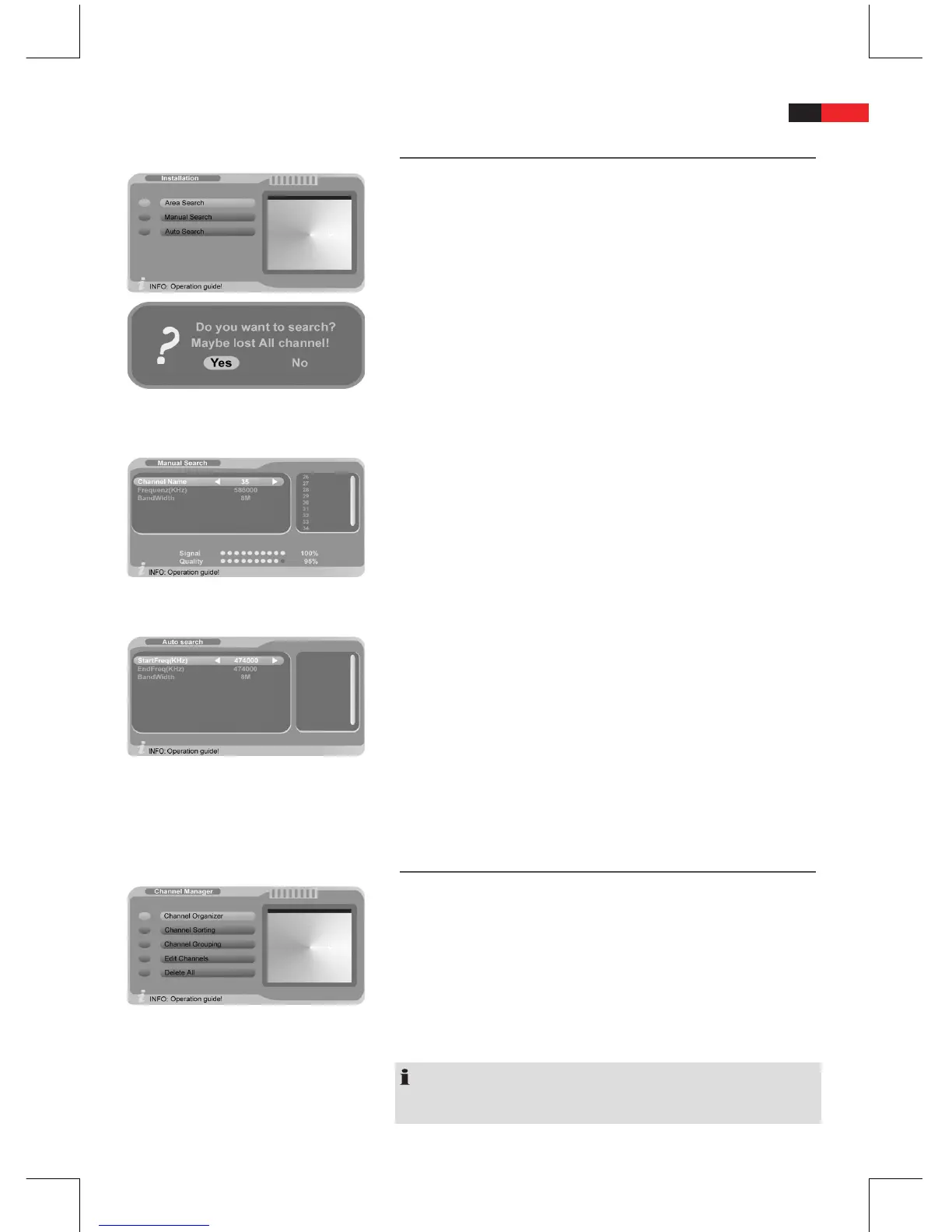
Auto Search (Area Search):
For automatic channel scan select option “Auto Search”.
B
Select “Yes” in the security prompt and press “ENTER“ to start the
B
scan.
All available channels are scanned and saved.
Manual Search:
Use this menu to change the settings for the individual channels.
You need to know channel number, frequency range and bandwidth.
Use the navigation buttons
B
◄ and ► to change the setting.
Press “ENTER “ to activate the scan after nishing all settings.
B
All scanned channels are saved.
Frequency Search (Auto Search):
Use this menu to set start and end frequency as well as the bandwidth to
scan a specic frequency band.
Use the navigation buttons
B
▼ or ▲ to select the individual
options.
Use the navigation buttons
B
◄ and ► to change the setting.
After nishing the settings press “ENTER” to activate the channel B
scan.
All scanned channels are saved.
Channel Manager
Access the “Channel Manager” menu.
B
Select among
“Channel Organizer”,
•
“Channel Sorting”,
•
“Channel Grouping”,
•
“Edit Channels” and
•
“Delete All”
•
NOTE:
Radio channel settings can only be carried out if they are broadcast by
the service provider. Check with your service provider, if necessary.


 To Next Page