24
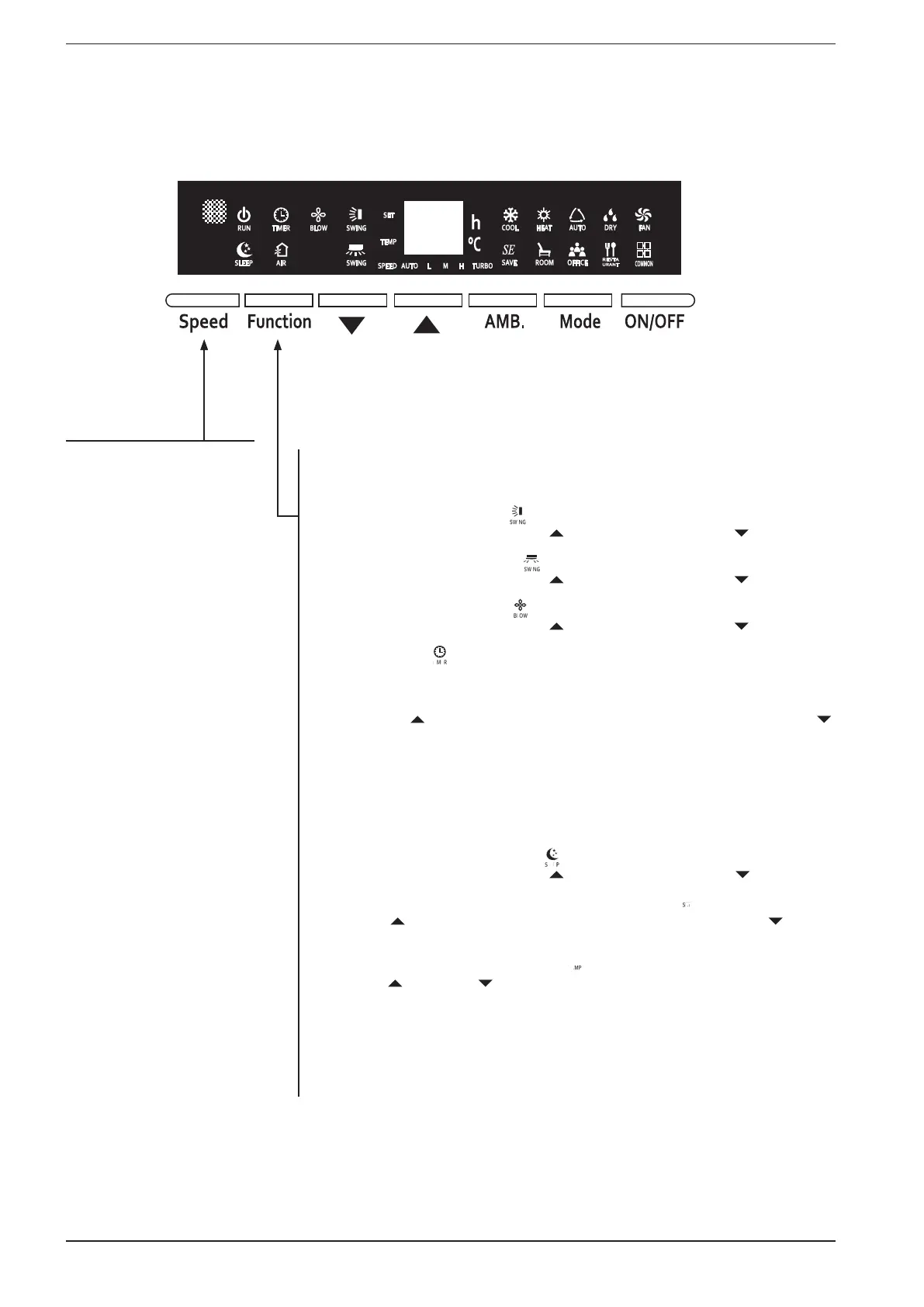
The speed of the fans can be
changed by pressing the SPEED
key (for modes that permit);
there are 5 various speeds
available (all indicated by the
corresponding icon displayed
on the display of the machine's
on board panel): auto, low,
medium, high and turbo.
The functions available on the unit can be set by pressing the Function key; each time
this button is pressed, will switch to the next function, according to the following list (warn-
ing: the icon flashes to indicate that the function is selected):
(1) Set continuous vertical swing ( ):
the function is enabled by pressing key ( ) and stopped pressing key ( );
(2) Set continuous horizontal swing ( ):
the function is enabled by pressing key ( ) and stopped pressing key ( );
(3) Set the continuous ventilation ( ):
the function is enabled by pressing key ( ) and stopped pressing key ( );
(4) Set the Off timer ( ):
WARNING: the unit can manage two different timers, one for the programmed OFF and
one for the ON; if the procedure is performed with the machine on, an Off timer will be
set, and if carried out with the machine off, an On timer will be set.
Pressing the key ( ) will increase the number of hours set for the timer, while the key ( )
will decrease the number of hours set for the timer; to confirm the value to be assigned,
just press the Function key, passing to the next function or wait for 5 seconds without
pressing any key.
Once a timer has been set, the relative icon will remain on indicating that a programmed
On or Off is set on the system; to delete a time setting, enter it as mentioned above and
set the "blank character" as the new value, which is shown by scrolling all the values up
to the value after 24;
(5) Set the night-time comfort function ( ):
the function is enabled by pressing key ( ) and disabled pressing key ( );
(6) Set the operating set-point for the active operating mode ( ):
pressing the ( ) key increases the operating set-point, while pressing the ( ) key will
decrease the operating set-point;
(7) Displays the current room temperature ( ):
pressing the ( ) key or the ( ) key displays the room temperature value on the display
of the unit;



 To Next Page