APX2UX
0403
6559707_01
Sostituisce - Replace
Remplace - Ersetzt:
65597.07/9801
Pannello comandi per ventilconvettori
Control panel for fan coils
Panneau de commande pour ventiloconvecteurs
Fernbedienung für Gebläsekonvektoren
PX 2
IL PANNELLO COMANDI PX2
Il pannello comandi PX2 per ventilconvettori, può essere instal-
lato a bordo macchina (solo FCX AS ed U) o in posizione
remota rispetto all’unità di condizionamento. Il kit di assem-
blaggio è costituito dal pannello comandi, dal supporto pannel-
lo per montaggio a bordo macchina e dai collegamenti elettrici.
Ogni pannello può controllare un solo ventilconvettore.
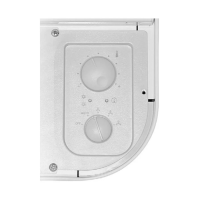
Il pannello comandi comprende (fig. 1):
– interruttore acceso-spento (A);
– commutatore delle tre velocità di ventilazione (B).
FUNZIONAMENTO DEL PANNELLO COMANDI
Per accendere/spegnere il ventilconvettore (fig.2):
– Aprire le alette (solo per le versioni FCX U ed OMNIA).
– Commutare la posizione del selettore superiore.
Per scegliere la velocità del ventilatore (fig.3):
– Commutare la posizione del selettore inferiore in base alla
velocità prescelta.
CONTROL PANEL PX2
The PX2 control panel for fancoils can be installed on board
the fancoil unit (only FCX AS and U) or in a remote position.
The assembly kit comprises the panel, the panel bracket for
on-board assembly and electrical connectors.
Each panel controls a single fancoil.
The control panel (fig. 1) includes:
– ON/OFF switch (A);
– three-speed fan operation selector (B).
OPERATING WITH CONTROL PANEL
To turn on/off the fan coil (fig.2):
– Open the louvers (only FCX U and OMNIA versions).
– Shift the upper button.
To select fan coil speed (fig.3)
– Switch over position of lower selector according to reque-
sted speed.
PANNEAU DE COMMANDE PX2
Le panneau de commande PX2 pour ventiloconvecteurs peut
être installé sur l’appareil (seulement pour le versions FCX AS et
U) ou dans une position à distance par rapport à l’unité de
climatisation. Le kit d’assemblage est constitué par le panneau
de commande, le support du panneau pour montage sur
l’appareil et les raccordements électriques.
Chaque panneau ne peut contrôler qu’un seul ventiloconvecteur.
Le panneau de commande comprend (fig. 1):
– interrupteur M/A (A);
– commutateur des trois vitesses de ventilation (B).
FONCTIONNEMENT DU PANNEAU COMANDI
Pour allumer/eteindre le ventilconvecteur (fig.2):
– Ouvrir les ailettes (seulement pour le versions FCX U et OMNIA).
– Pouser le bouton du haut.
Pour choisir la vitesse du ventilateur (fig.3)
– Commuter la position du selecteur inférieur selon la vitesse
préchoisie.
FERNBEDIENUNG
PX2
Die
Fernbedienung
PX2 für Gebläsekonvektoren
(nur für
Versionen FCX AS und U)
kann am Gerät oder entfernt vom
Gerät installiert werden.
Das Montagekit besteht aus der
Fernbedienung
, der Halterung
für die Anbringung am Gerät und den elektrischen Anschlüssen.
Jede
Fernbedienung
kann nur einen Gebläsekonvektor steuern.
Die
Fernbedienung
besteht aus (Abb. 1):
– Ein-/Ausschalter (A);
– Umschalter der drei Ventilatordrehzahlen (B).
BETRIEB DER BEDIENUNGSTAFEL
Einschalten/Ausschalten des Gebläsekonvektors: (fig.2):
– Die lamellen offnen (nur für Versionen FCX U und OMNIA).
– Die obene taste drücken.
Ventilatordrehzahl wählen (fig.3)
– Die Position des unteren Wahlschalters je nach der einge-
stellten Drehzahl umschalten.
Fig. 2
Fig. 1


 To Next Page
 Need help?
 General