6
Test Settings: General OTDR Test Modes
Setup
Parameter
General-Purpose OTDR Test Mode
Full Auto Real Time Expert
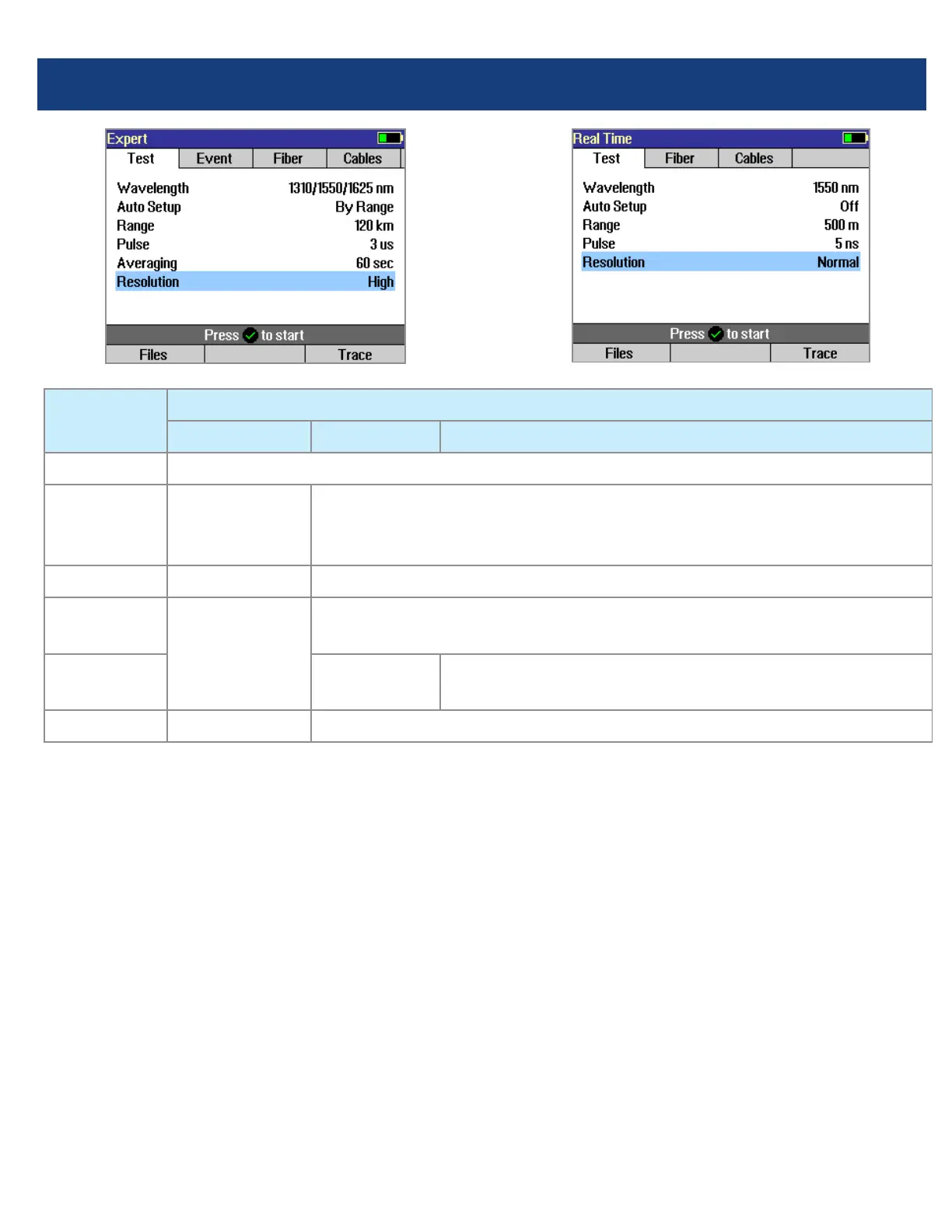
Wavelength User selects single or multiple wavelength(s) at which to test.
Auto Setup N/A
(not applicable)
[Off]: User sets all parameters manually.
[By Range]: User sets [Range] & [Resolution], [Pulse width] &
[Averaging] selected automatically.
Range N/A: automatic User sets OTDR scan range.
Pulse width N/A: automatic,
based on auto-
detected range
Automatic if [Auto Setup] parameter is set to [By Range] option.
User-set if [Auto Setup] parameter is set to option [Off].
Averaging N/A: 1 second
updates
Automatic if [Auto Setup] is set to [By Range].
User-set if [Auto Setup] is set to [Off].
Resolution N/A: automatic User-set [High] or [Normal].
Range: When setting manually, select [Range],
which is at least 20% longer than the ber under
test.
Pulse width [Pulse]: Select wider pulse widths to
obtain cleaner traces (less noisy). Select narrower
pulse widths to detect events which are close
together (better resolution).
Averaging Time [Averaging]: Longer averaging
times produce cleaner traces.
Resolution: [High] resolution provides close data
spacing for more precise event location and better
detection of closely spaced events. [Normal]
resolution uses more ltering to provide a cleaner
trace, but with lower resolution.



 To Next Page