7
Parameter FTTx PON OTDR Test Mode
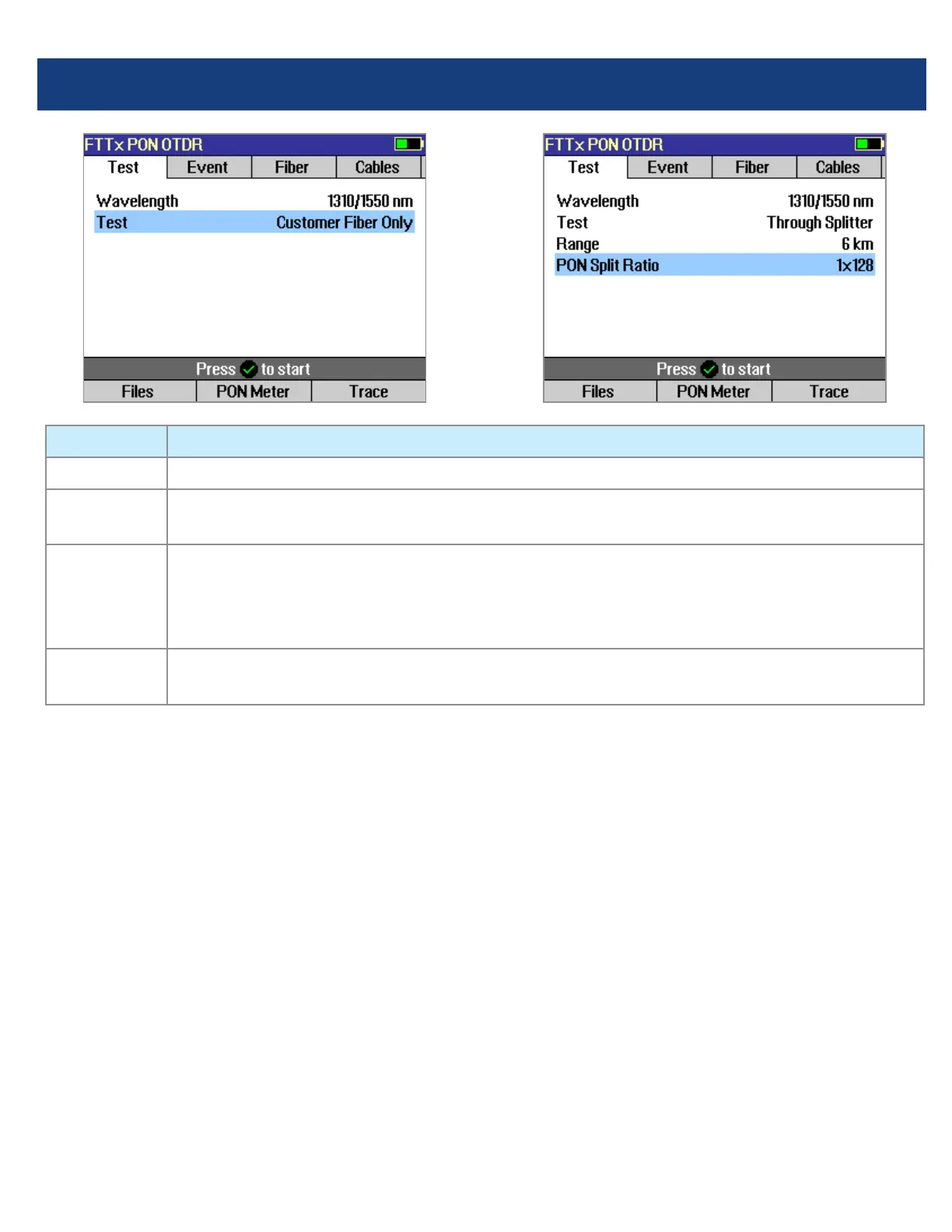
Wavelength User selects single or multiple wavelength(s) at which to test.
Range Auto: Range, pulse width, resolution, averaging are automatically determined.
Distance settings: User manually selects setting in range 250 m to 240 km.
Test If set to [Customer Fiber Only], tests only to the splitter using automatically determined
Range setting.
If set to [Through Splitter], tests through splitter including customer and feeder bers using
selected automatic or manual range setting.
PON Not present if [Test] parameter is set to [Customer Fiber Only] option. If [Test] is set to
[Through Splitter], user sets PON split ratio (1x8, 1x16, x132, 1x64, or 1x128).
Test Settings: FTTx PON OTDR Test Mode
Range: When setting manually, select [Range],
which is at least 20% longer than the ber under
test.
Pulse width [Pulse]: If testing through splitter,
pulse width is set automatically based on [Range]
and [PON] split ratio. If testing customer drop ber
only (In Service), automatically set based on range
to splitter.
When testing through a splitter, user can force
a wider pulse width to improve trace quality by
selecting a longer [Range] or higher [PON] split
ratio.
Averaging Time: Also set automatically.
Resolution: Since PONs are usually short, resolution
is typically set to High (close data spacing) for more
precise event location.



 To Next Page