7
Caution: In manual mode, the beam rotates even if the laser is not leveled. The
H.I. Alert function is not available when the unit is in manual mode.
To switch to the Y axis, press the H.I. key. Both LEDs (8 and 9) will blink,
indicating you’re in manual mode and can match slope in the Y axis.
Note: The Y axis grade will be at a 90 degree angle from the X axis grade
output. Press < to match a positive slope in Y and > to match a negative
slope.
Press the Auto/Man key to return to automatic mode.
Adjusting Beam Left or Right
After placing the laser in vertical position (see Setup section), the plumb
beam out the top of the head can be moved to the left or right, using the <
or > keys. This is necessary to do squaring for installing walls and partitions.
Batteries
Laser Battery
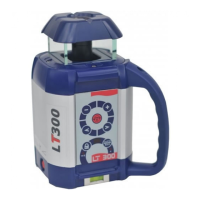
The LT300 has a NiCad rechargeable battery that should be charged for 15
hours before first use.
Charging the Battery
1) Remove the charging connector cover on the side of the laser. Insert the
charger plug and fully engage the threads.
2) Plug the charger into an electrical outlet (110 volts or 220 volts,
depending on charger and country).
3) Charge for 15 hours. When the charger is plugged in, a red light will
illuminate on the charger.
The LT300 can be charged while working. If electricity is available on the job
site, simply plug in the charger and keep on working.
For optimum life of the battery, it is recommended to charge the battery
after fully discharged. To assure battery life, do not charge over 20 hours.
Although the LT300 is waterproof,
do
not charge it while it is in water or submerged.



 To Next Page