The control mode frame package is used to set the control mode of the chassis, as shown in Table
3-7.
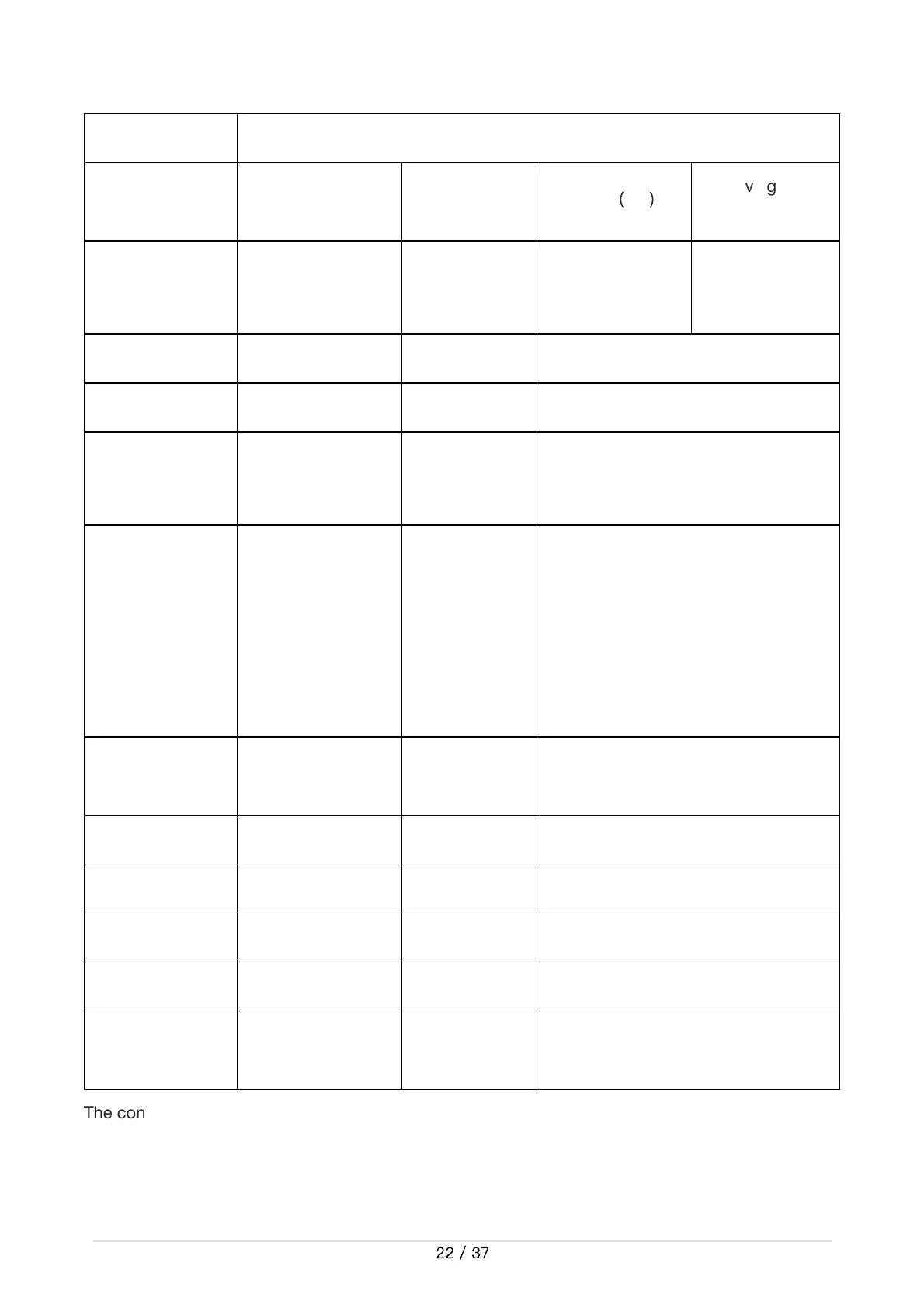
Table 3.7 Control mode setting frame description table
CommandName LightControlFeedbackFrame
SendingNode ReceivingNode ID Cycle
(
ms
)
ReceivingTimeo
ut(ms)
Wire-controlled
chassis
Decisioncontrolu
nit
0x231 20ms None
Datalength 0x08
Location Function Datatype Description
byte[0]
Currentlightcontr
ol enablingsign
unsignedint8
0x00Invalidcontrolcommand
0x01Lightcontrolenabling
byte[1]
Frontlightmode
unsignedint8
0x00 Normally off
0x01Normallyopen
0x02 Breathing light mode
0x03Customer-
definedbrightness
byte[2]
Currentfrontlight
custom brightness
unsignedint8
[0,100],where0isnotbright,100is
thebrightest
byte[3] Reserved 0x00
byte[4] Reserved 0x00
byte[5] Reserved 0x00
byte[6] Reserved 0x00
byte[7]
Countcheck(count
)
unsigned int8
0~255loopcount,countuponce
everytimea commandissent


 To Next Page
 Loading...