Environmentdescriptionofusageexample
Ubuntu 18.04 LTS
ROS Kinetic
Git
Hardwareconnectionandpreparation
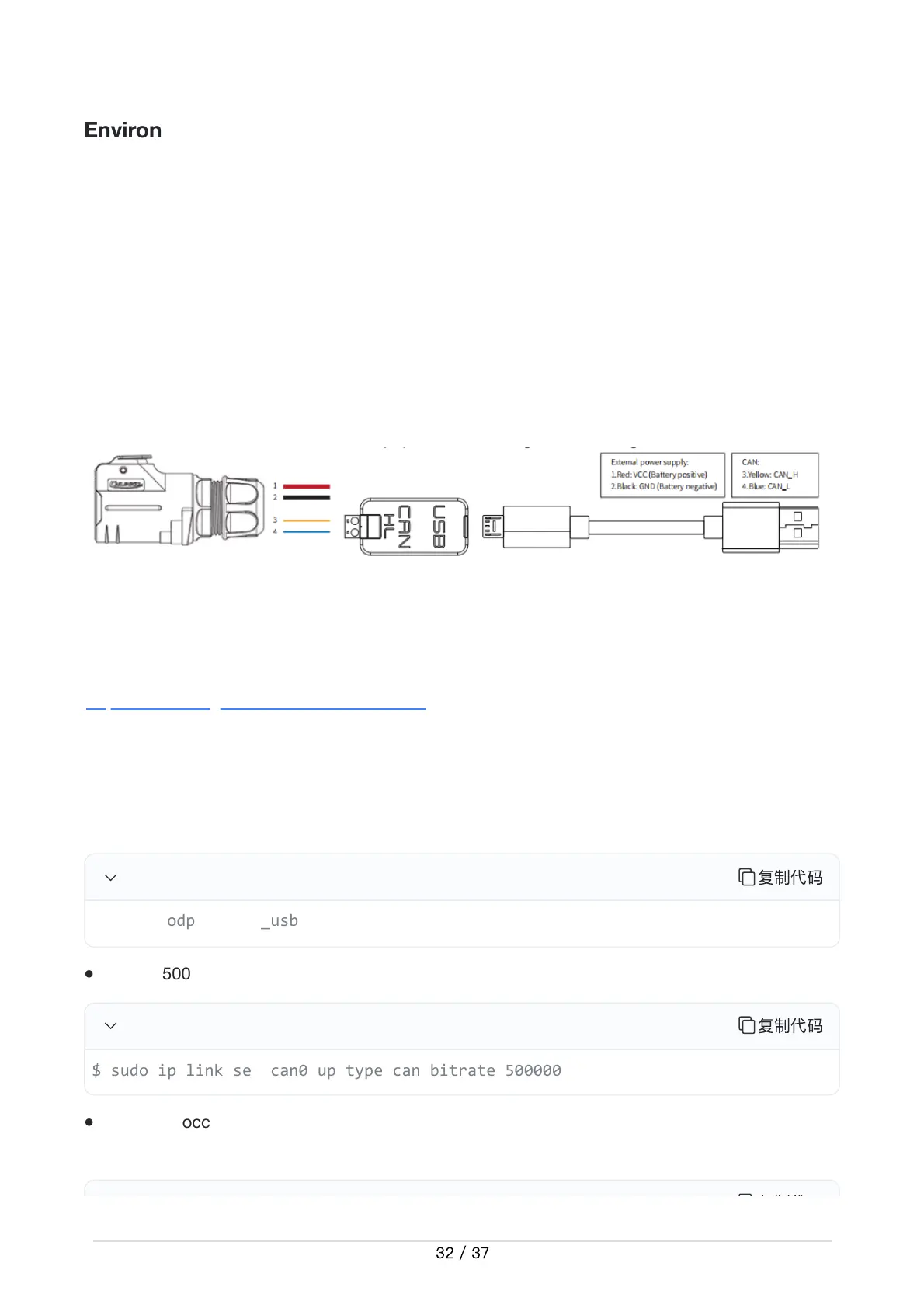
Pull out the CAN line of the TRACER MINI rear aviation plug, and connect the CAN_H and
CAN_L in the CAN line to the CAN_TO_USB adapter respectively;
Turn on the chassis knob switch of the TRACER MINI mobile robot;
Connect CAN_TO_USB to the USB port of the laptop. The connection diagram is shown in
Figure 3.4.
Figure 3.4 CAN line connection diagram
ROSInstallationandEnvironmentSetup
For installation details, please refer to
http://wiki.ros.org/kinetic/Installation/Ubuntu
TestCANABLEhardwareandCANcommunication
Setting CAN-TO-USB adaptor
Enable gs_usb kernel module
复
制
代
码
Setting 500k Baud rate and enable can-to-usb adaptor
复
制
代
码
If no error occurred in the previous steps, you should be able to use the command to view the
can device immediately
复
制
代
●
●
●
●
●
●
●


 To Next Page