24
4.2.2 USING THE BLUETOOTH
®
INTERCOM
4.2.2.1 Starting / Ending Bluetooth
®
intercom calls
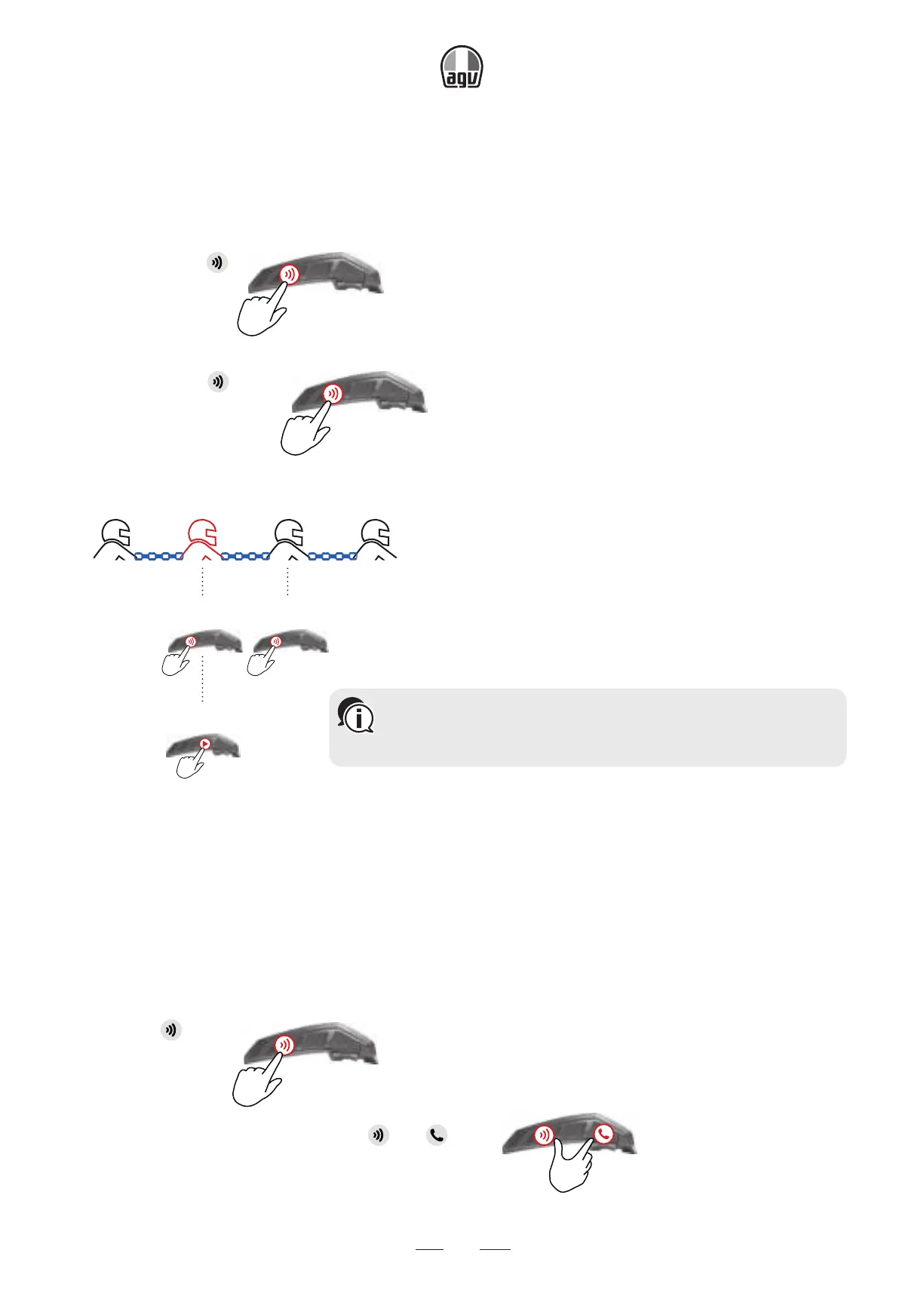
To start or end communication with Rider 1:
• Rider 1: tap .
x1
To start or end communication with Rider 2:
• Rider 2: tap twice.
x2
To initiate a 4-way Bluetooth
®
conference:
Rider 1 You Rider 2 Rider 3
x1
Connect
to rider 1
x1
Connects
to rider 3
Connects
to rider 2
x2
4.2.2.2 Receiving Bluetooth
®
intercom calls
If another paired unit calls you via Bluetooth
®
intercom and in standby, the call begins instantly.
4.2.3 USING THE BLUETOOTH
®
INTERCOM
Resetting Bluetooth
®
intercom pairing also resets all Bluetooth
®
device pairing.
To reset Bluetooth
®
intercom pairing:
1. Press for 5".
5”
2. When the LED flashes red, press and for 2".
2"
→ The LED flashes purple five times slowly, confirming that pairing has been reset.
You can also start the Bluetooth intercom by making a loud
noise, for example, by saying "Hey." If channels A and B are
already paired, the conversation starts for both of them.


 To Next Page